
What the Siri AI Developer Preview changes
The Siri AI Developer Preview opens development of custom app actions and content through App Intents in the 27.3 betas. Announced November 3, 2026, it also introduces skills and broader semantic discovery. It is an early integration opportunity, with customer distribution and App Store submissions described as later milestones.
What Apple announced on November 3
Apple's November 3 announcement describes a new Developer Preview that lets developers bring their app's content and actions directly into Siri AI through App Intents. The practical change is an integration opportunity: developers can explore how Siri interprets requests, discovers relevant app information, and carries out actions the app exposes. The announcement also introduces skills for combining actions and expands the kinds of entities Siri can surface from the Spotlight semantic index.
This documentation-based review separates those announced capabilities from implementation details that the available material does not establish. It provides a basis for deciding what to investigate or build, rather than evidence that a particular third-party app already delivers the complete experience to customers. For shoppers, the announcement signals future possibilities. For development teams, it supports starting focused exploration now.
The preview platforms and the watchOS distinction
The announcement's opening explicitly names the iOS 27.3, iPadOS 27.3, macOS 27.3, and visionOS 27.3 betas as the platforms introducing this Developer Preview. Teams should use that four-platform statement when describing the announced development scope. A separate footnote lists watchOS 27.3 among platforms where Siri AI is available in beta, but that consumer availability statement does not explicitly establish watchOS as a platform for the new third-party SDK preview.
Apple's consumer setup article uses the broader operating-system generation, OS 27, rather than the announcement's specific 27.3 beta versions. These sources answer different questions: whether Siri AI is available to an eligible user, and where developers can explore the newly announced integration. Do not turn either statement into a promise that every OS 27 installation exposes identical development features or app actions.
App Intents expose defined actions and content
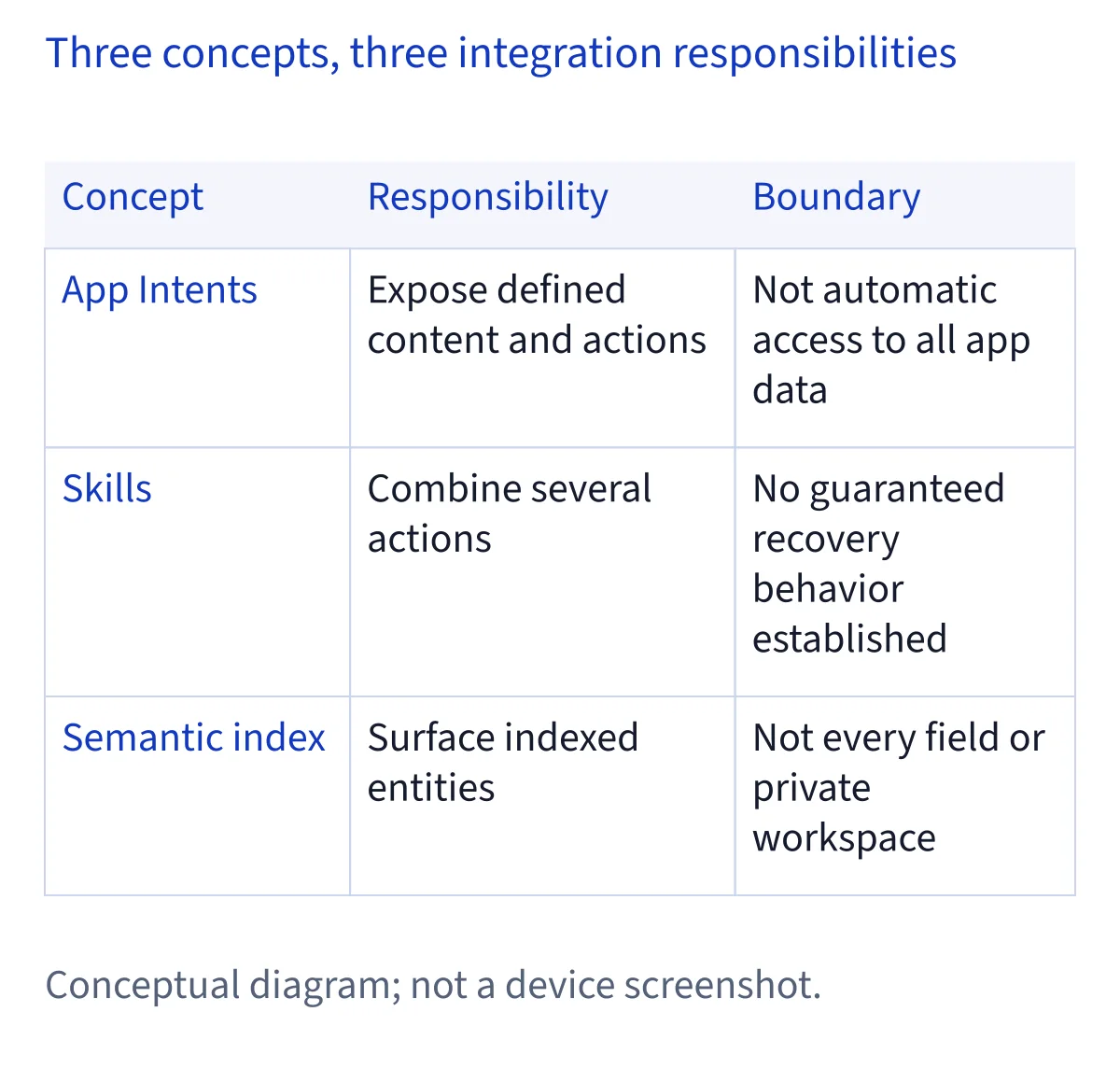
Apple says the preview lets any app bring custom content and actions into Siri AI using App Intents. Its examples range from checking a delivery to booking a reservation or placing an order. These examples illustrate possible integration categories; they do not confirm named delivery services, restaurants, ordering providers, or currently released app versions. Nor does the announcement say that installing an app automatically makes all its data accessible.
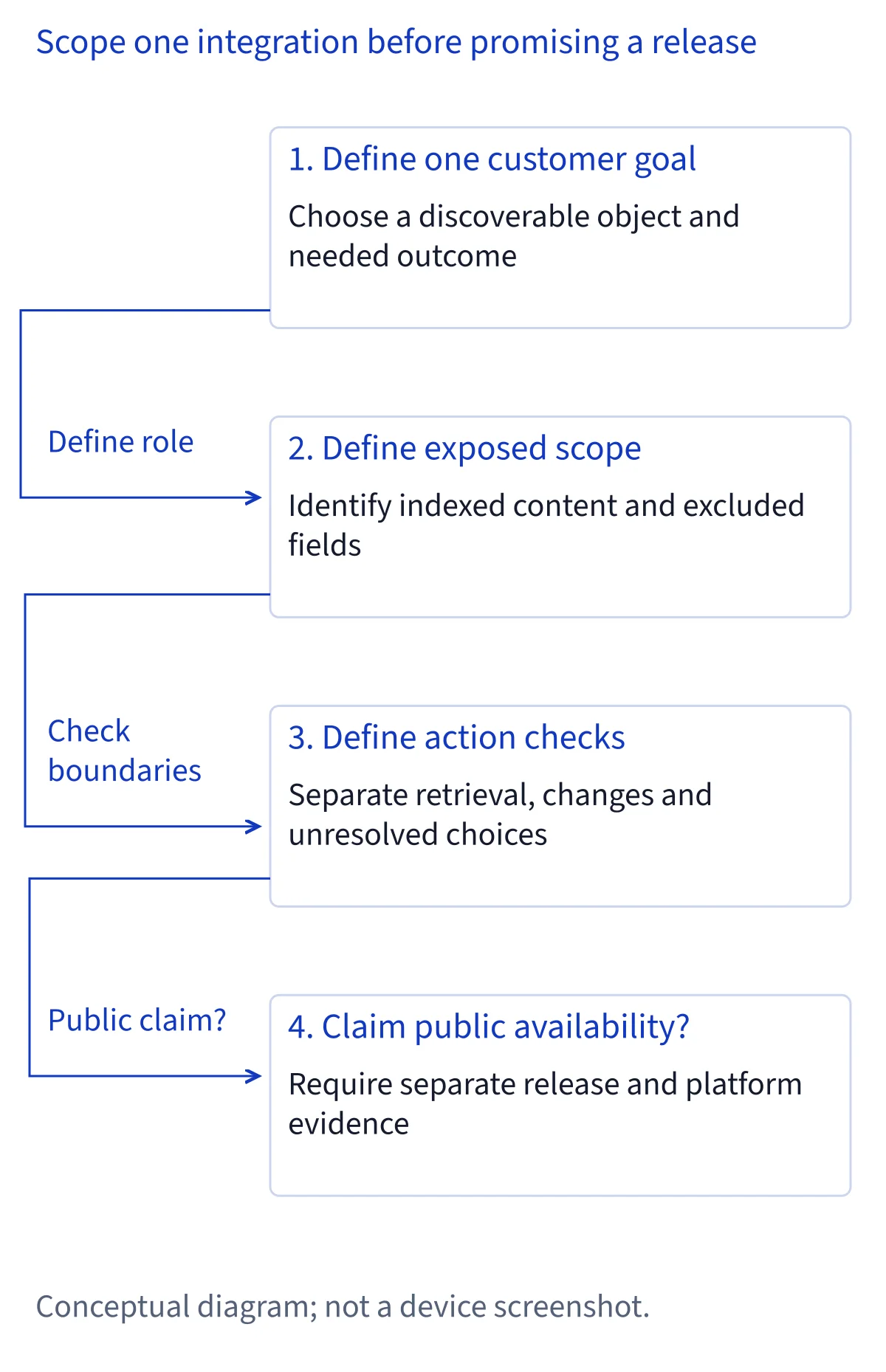
A useful planning exercise is to select one customer goal and describe the information and action it requires. A proposed delivery lookup might need a selected shipment and return its status; a proposed reservation action would involve a different set of choices and consequences. These are design examples, not official commands. Keep each proposed capability bounded enough that a user can understand what information it reads and what it changes.
Skills address requests that involve several actions
Skills are the announcement's mechanism for teaching Siri AI how to combine several actions into a single experience. That is a different planning problem from exposing one isolated operation. A useful experience needs a coherent relationship between its steps, especially when information discovered early determines what can happen later. The supplied announcement establishes that composition concept, without documenting exact method signatures or execution guarantees.
For development planning, map the intended outcome before adding more actions. Identify which steps only retrieve information, which change app state, and which depend on a user choice. Then propose checks for missing information, ambiguous selections, or an interrupted sequence. These are recommended evaluation questions, not claims about built-in SDK recovery behavior. A short, understandable sequence is a better initial investigation than an ambitious workflow whose partial completion would confuse the user.
Semantic entities broaden discovery without implying total access
Apple states that Siri AI can now surface any entity in the Spotlight semantic index, rather than only entities fitting an existing schema. The distinction matters for apps whose meaningful objects do not match a familiar predefined category. It points toward broader discovery of app-defined information, while leaving the actual indexed content and integration scope essential to understanding what a particular app can provide.
Teams can prepare by reviewing the objects users would naturally look for and the names that distinguish them. As a proposed check, consider whether two similarly named records could be confused, or whether an old title would still identify the intended item. Record which fields are necessary for discovery and which should remain outside the proposed content scope. Semantic discovery is not evidence that Siri can inspect every database field, attachment, private workspace, or account an app contains.
Discovery contracts make an integration easier to evaluate
Before implementation, a team can write a discovery contract: an internal description of what a person may ask for, which app objects are eligible, and what counts as a useful result. This is an editorial recommendation for project planning, not an Apple API type or a promised SDK feature. Its purpose is to make assumptions visible before a natural-language interface hides them behind a fluent response.
Describe the intended content scope, recognizable object names, required inputs, and expected outcome in ordinary language. Include how the app should communicate an empty result or an unresolved choice. For multilingual products, review whether names and action descriptions remain understandable in each supported customer language. This work helps separate a discovery failure from an action failure: finding the wrong record and failing to update the right record require different investigations and different explanations.
Permissions, failure reporting, and redacted evaluation
A proposed evaluation should examine permission boundaries alongside successful requests. Consider what happens when an account lacks access to a record, the user excludes an app from Siri, or the requested operation cannot finish. Apple's Siri privacy documentation describes an Excluded Apps control for limiting how an app contributes information or participates in actions and suggestions. That broader user control does not establish the preview's exact permission callbacks or implementation requirements.
For internal testing plans, use synthetic records or carefully redacted examples and distinguish intended behavior from observed results. Record the selected object, the attempted operation, and whether any change actually occurred, without retaining unnecessary personal content. Recommend clear failure explanations that avoid implying completion when nothing changed. These are practical quality goals; this guide does not claim that the preview automatically supplies these reports, recovery paths, or test facilities.
Keep Shortcuts, Apple rollouts, and vendor claims separate
Existing Shortcuts support is useful evidence about an app's documented workflows, but it does not by itself verify adoption of this new preview. Likewise, Apple's announced rollout across Calendar, Files, Finder, Journal, Mail, Maps, Messages, Music, Notes, Photos, Preview, Reminders, Safari, Shortcuts, and Weather concerns Apple apps. The examples of finding a previously visited coffee shop or archiving older files do not establish identical actions in every third-party product or on every platform.
Vendor documentation deserves its own reading. Craft, for example, documents updated Siri capabilities, but the available evidence does not independently confirm its public integration status with this newly announced Siri AI preview. Avoid both blanket conclusions: that every existing Siri integration has already adopted the preview, or that every vendor's updated Siri capability must be unavailable. Describe the specific evidence and its scope.
Customer launch and submissions remain separate milestones
Apple describes early access before first shipping to customers in a few months, with App Store submissions opening in the spring. The announcement supplies no exact day for either milestone. These statements should remain planning windows, not a dated promise that a particular integration will be downloadable, approved, or available to every eligible user at once.
For teams, distinguish an exploration milestone from a customer commitment. An internal prototype may help evaluate content discovery and action design without settling public distribution, final policy terms, or launch readiness. Apple also says it will share more details about terms and usage policies. Build room to review those details when available. The retrieved technical documentation did not provide readable API content, so specific method signatures, entitlement requirements, signing arrangements, and TestFlight distribution rules are not established here and should not be presented as confirmed instructions.
What shoppers should check before choosing an app
If you are choosing an app for a task today, begin with the vendor's documented capability and the released product you can actually obtain. Look for a precise description of what Siri can find or change, any stated content limits, and the platform involved. Treat a developer-preview announcement as context for future development rather than a substitute for those customer-facing details. A reservation example in Apple's announcement is not proof that your preferred booking app supports it.
Then check Siri AI eligibility separately. Its current six languages are English, French, Japanese, Korean, Portuguese, and Spanish, with matching device and Siri languages required. EU availability differs between mobile platforms and Mac or Vision Pro, and mainland China Apple Account regions are currently unsupported. These conditions affect whether you can use Siri AI; they do not independently verify an app's new integration.
What a development team can responsibly commit to now
A responsible near-term commitment is a bounded investigation with explicit questions: which customer goal matters, which content should be discoverable, which custom action is useful, and how the outcome will be evaluated. Choose one platform from the announced preview scope and document the environment used when actual evaluation begins. Keep proposed checks distinct from completed tests, and avoid publishing broad support claims based only on a successful prototype or the presence of existing Shortcuts actions.
Privacy review should distinguish Siri's general processing from the app's own obligations. Apple's privacy material says requests may be processed on device or through Private Cloud Compute, while third-party interactions remain subject to the service's terms and privacy policy. Optional improvement-data settings are another separate consideration. None of that removes the need to explain the app's content boundaries or verify the preview's eventual implementation and distribution requirements.
Common questions
Does the Developer Preview mean third-party Siri AI apps are publicly available?
No. Apple's announcement describes early developer access, with customer shipping in a few months and App Store submissions opening in the spring. It gives no exact launch day. A specific vendor may document Siri capabilities separately, so assess that evidence on its own rather than treating the preview as proof of public availability.
Is watchOS included in the new third-party Developer Preview?
The announcement explicitly introduces the Developer Preview for iOS, iPadOS, macOS, and visionOS 27.3 betas. Its footnote also lists watchOS 27.3 for Siri AI beta availability. That footnote does not explicitly establish watchOS participation in the new third-party SDK preview, so do not use it as confirmation of that development scope.
Does existing Shortcuts support prove adoption of the preview?
Existing Shortcuts documentation proves only the capabilities it actually describes. It does not automatically establish integration with the newly announced Siri AI preview. Look for evidence about the specific Siri experience, platform, content boundaries, and customer release. Apple's own app rollout and a vendor's separate Siri documentation also need to be evaluated independently.
Will Siri AI gain access to all information inside an integrated app?
The announcement does not establish unrestricted access to every app's data. It describes custom content and actions through App Intents and discovery of entities in the Spotlight semantic index. The app's exposed content, user controls, and applicable privacy terms matter. Broader discovery should not be interpreted as access to every record, attachment, or account.