
Plan local storage for Siri AI
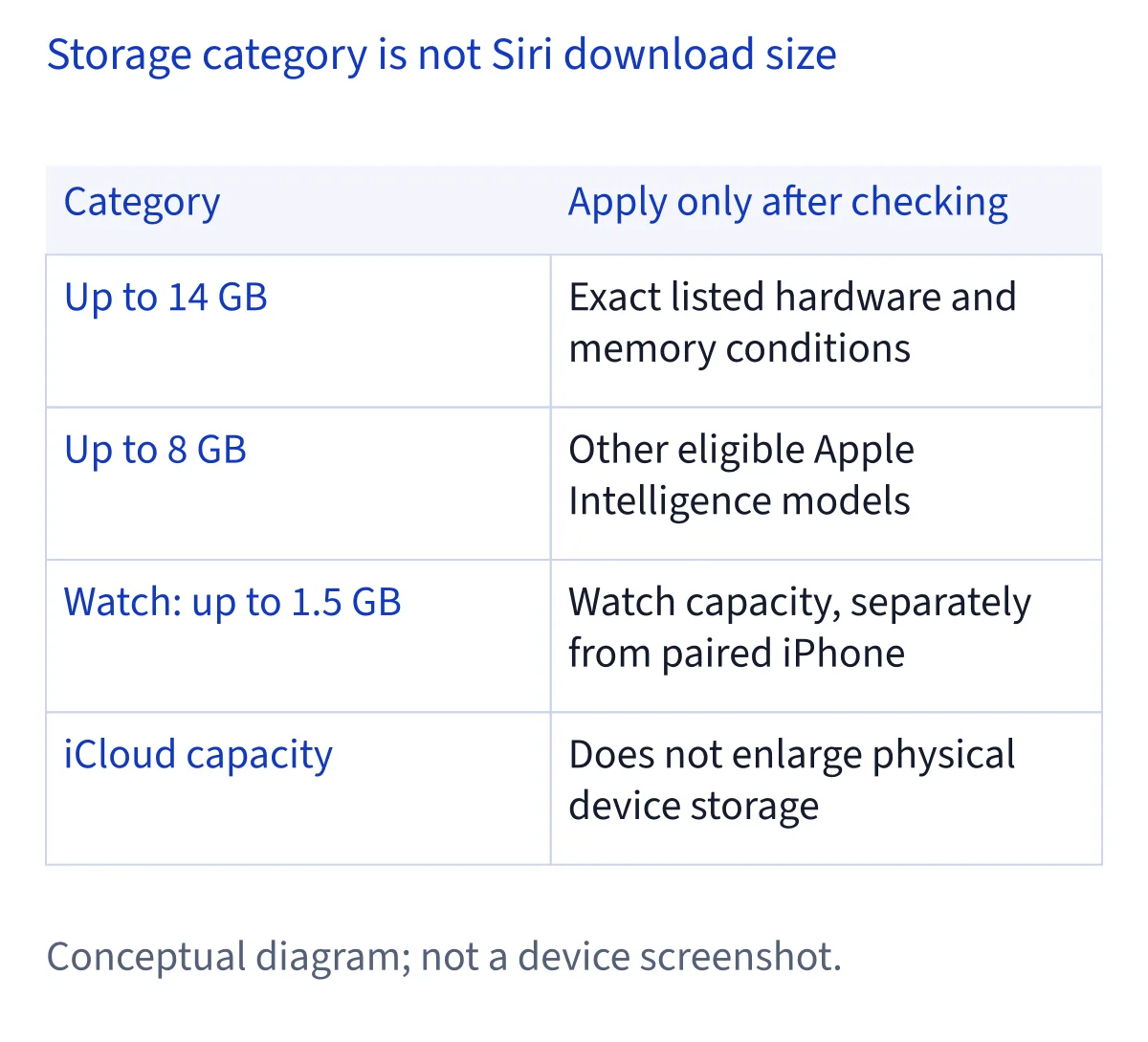
Plan around Apple's device-specific Apple Intelligence storage requirements: up to 14 GB on its specified advanced devices, up to 8 GB on other supported phones, tablets, Macs and Vision Pro models, and up to 1.5 GB on Apple Watch. These describe the wider system; updates can temporarily require more.
Read the storage figures as system requirements
Apple's storage figures answer a capacity-planning question: how much local storage the Apple Intelligence ecosystem may require on a particular supported device. They do not identify a separately measured Siri AI download, a fixed installer size, or the amount every owner will see immediately after activation. This documentation-based review uses Apple's Apple Intelligence requirements for capacity and its Siri AI setup article for the assistant's activation behavior.
The distinction matters when deciding what to remove. A device already using Apple Intelligence may already contain relevant assets, but the documentation does not establish how much Siri AI will reuse or download additionally. Do not automatically subtract 14 GB or 8 GB from today's available space as though that exact amount must arrive next. Instead, identify the applicable category, inspect current storage, and account separately for any pending system update.
Identify the exact devices in the 14 GB category
Apple specifies up to 14 GB of on-device storage for iPhone Duo, iPhone 17 Pro models and later, and iPhone Air. Its iPad category requires an M4 or later chip and at least 12 GB of unified memory. Its Mac category requires an M3 or later chip and at least 12 GB of unified memory. Apple Vision Pro with M5 is also explicitly included. Both the chip and memory conditions matter wherever Apple states both.
Check the exact model and configuration before applying this allowance. Unified memory is a hardware specification, not free storage: clearing files cannot turn a lower-memory configuration into a qualifying one. Likewise, a product family name alone may not settle which category applies. Use the compatibility guide to establish eligibility, then return to this narrower storage classification rather than assuming all eligible devices need the largest allowance.
Keep the 8 GB category separate from voice features
For other Apple Intelligence-enabled iPhone, iPad, Mac and Apple Vision Pro models, Apple lists up to 8 GB of storage. Apply this category only after confirming that the device is supported and does not meet the separately stated 14 GB criteria. The number is not an entitlement to Siri AI in every region, nor a guarantee that an unsupported device becomes eligible when enough space is cleared.
The iPad mini with A20 Pro illustrates why feature lists should not replace the storage list. Apple's Siri AI article includes that model among devices supporting expressive voices, but the storage requirements do not place it in the 14 GB group. Under the supplied storage classification, it belongs with the other supported iPad models at up to 8 GB. A feature's hardware list and an ecosystem storage category answer different questions.
Budget Apple Watch storage on the watch itself
Apple lists up to 1.5 GB of Apple Intelligence storage on Apple Watch. Treat that as a requirement on the watch, separate from the applicable allowance on its paired iPhone. More available space on the phone does not mean that the watch has the same space available. If preparing both devices, inspect their storage independently and note any update each still needs.
Siri AI on supported Apple Watch models also requires pairing with an Apple Intelligence-enabled iPhone that has Siri AI enabled. Storage readiness therefore does not replace the pairing requirement. Nor does the smaller watch figure establish that every action runs independently on the watch or that it contains the same models as the phone. Plan for both devices without adding their allowances together and presenting the result as a single Siri AI download.
Allow for temporary growth during model updates
Apple explicitly says Apple Intelligence storage may temporarily exceed its stated requirements during and shortly after a software update, while new models download and older ones are removed. Consequently, an observed total above the relevant figure during that period is not, by itself, proof of a permanent fault. Record whether the system is updating before interpreting a storage increase as unexplained growth.
Keep operating-system update capacity separate from the model allowance. The published 8 GB, 14 GB and 1.5 GB figures are not a complete estimate for installing the operating system and its temporary files. Follow any capacity message shown by the device for the actual update. Apple provides no universal extra free-space buffer in the supplied material, so a recommendation to keep an additional fixed number of gigabytes would go beyond the evidence.
Distinguish language downloads from storage faults
Changing Siri's language can start another preparation step. Apple says Apple Intelligence might become unavailable until the new Siri language finishes downloading and matches the device language. A language change therefore belongs in your storage notes: it can explain why preparation is still underway, even when the operating-system update has finished. The sources do not provide a fixed download size for each language.
Siri AI currently supports English, French, Japanese, Korean, Portuguese and Spanish, with the device and Siri set to the same supported language. The broader Apple Intelligence language list is not the Siri AI availability list. Choose the language you actually intend to use before comparing storage observations, and avoid repeated language switching as a proposed cleanup method. There is no documented promise that switching languages immediately removes a particular quantity of old assets.
Separate local capacity, iCloud and cloud processing
Local device storage, iCloud capacity and server processing serve different purposes. Buying more cloud storage does not enlarge the physical storage in an iPhone, iPad, Mac, Watch or Vision Pro. Moving selected personal files elsewhere may help only if their local copies are actually removed safely; the existence of a cloud copy alone does not establish that local space has been reclaimed.
Apple says Siri AI requests may be processed on the device or sent to Private Cloud Compute. That routing does not cancel the published on-device Apple Intelligence requirements, and it does not mean every request works offline. Separately, Siri conversation history can sync through iCloud using end-to-end encryption. Treat conversation syncing as a data feature, not a way to relocate system models or replace the local capacity needed by the operating system.
Record a useful storage baseline before activation
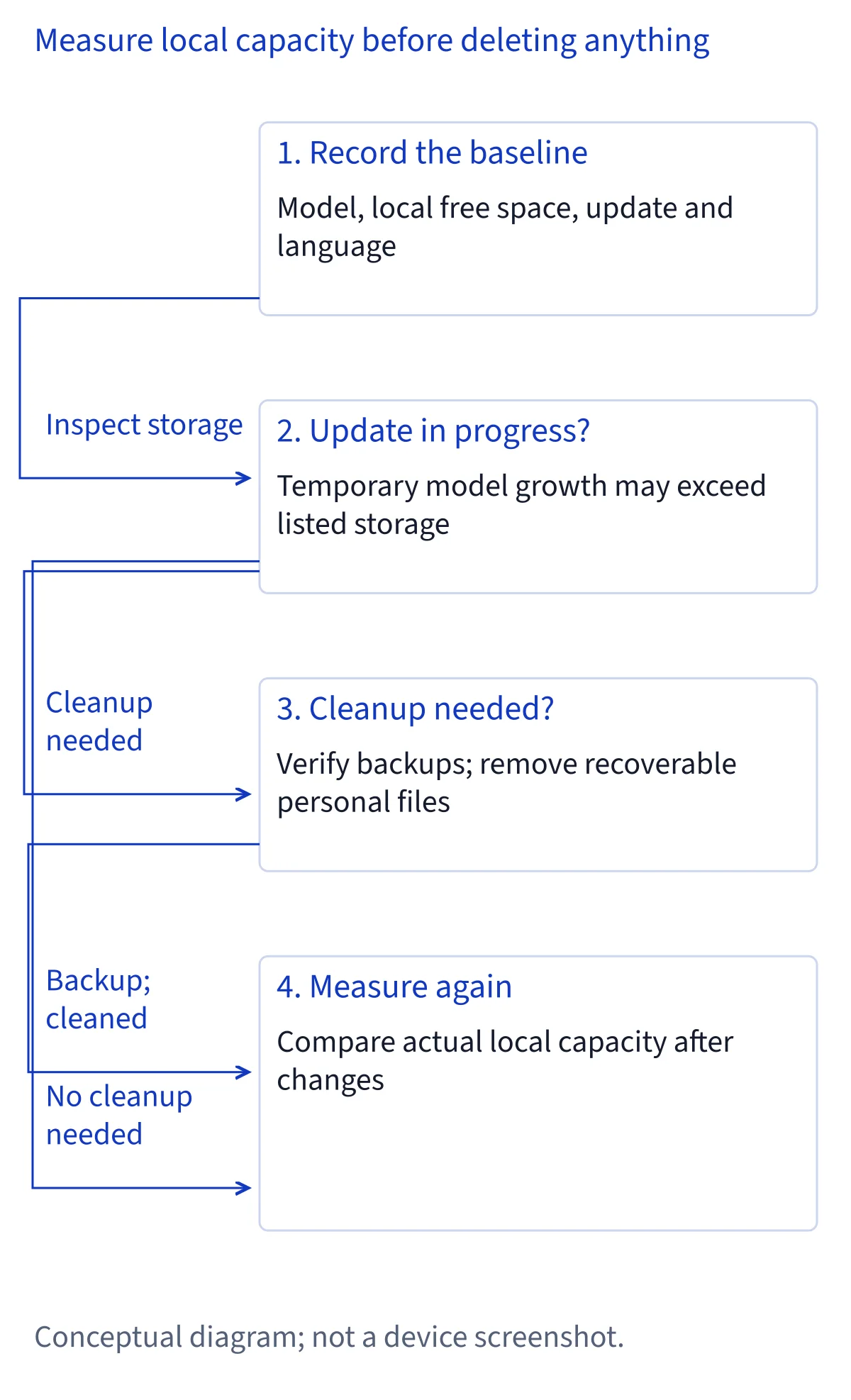
Before enabling Siri AI, make a simple record of the device model, available local storage, operating-system update status and selected language. In the device's storage overview, note the categories it actually displays and their current sizes. This is a proposed comparison method, not a claim that every platform presents a dedicated Siri AI category or labels model assets in the same way.
Repeat the observation after setup and any associated downloads have finished, noting the time and any other changes you made. If you downloaded videos, updated apps or removed files between readings, include those changes when interpreting the difference. An increase in a broad system category cannot isolate Siri AI's own footprint. If Apple Intelligence was already enabled, the before-and-after difference also cannot reveal the full amount of shared resources already present.
Free space through recoverable personal-file choices
Start with material you understand and can recover: downloads you no longer need, personal files with a verified backup, or media you know you can obtain again. Check that a backup opens and contains the expected files before removing an important local copy. For synced libraries, establish whether deletion also propagates to other devices or the cloud; synchronization should not be mistaken for an independent backup.
Apple's storage requirements link to official iPhone and iPad cleanup guidance and a separate Mac storage article, included in this guide's sources. Use the instructions appropriate to your device rather than guessing identical menu paths across platforms. Work in small batches and inspect available storage afterward. Leave system model folders alone: manually deleting them is not a documented cleanup procedure here and makes the outcome harder to assess.
Diagnose waiting without repeatedly deleting files
Apple says Siri AI begins downloading automatically after its setup steps, but high demand can first place users on a waitlist with variable waiting times. A waitlist is therefore not evidence that storage cleanup failed. Likewise, an unavailable entry can involve eligibility, account region or language conditions rather than capacity. Check the state actually shown before deciding to remove another group of personal files.
Use the setup guide for the activation sequence and return to storage only when a capacity message or your observations make it relevant. Free space cannot override Siri AI's current EU restrictions on iOS, iPadOS and watchOS, or the mainland China Apple Account restriction. A Mac or Vision Pro in the EU has different documented conditions. These distinctions prevent an availability issue from becoming an unnecessary and increasingly disruptive cleanup exercise.
Judge reclaimed space by observation, not promises
Turning Siri off should not be presented as a guaranteed way to recover 8 GB or 14 GB. Those are Apple Intelligence ecosystem requirements, and the supplied sources do not establish a fixed model-removal result from disabling Siri. Apple's privacy documentation separately describes deletion of local Siri and Dictation transcripts when using the stated controls. Removing transcripts and removing system models are different operations with different purposes.
If storage remains your deciding constraint, compare available capacity after your chosen, reversible cleanup and after any update-related model transition has completed. Keep the same device and language context for that comparison. Decide whether you can retain the personal content you need while accommodating the documented system requirements and actual update messages. If not, postponing activation is a reasonable planning choice; deleting unfamiliar system files is not a supported substitute.
Common questions
Is Siri AI a separate 14 GB download?
No separate 14 GB Siri AI download is established by the supplied documentation. Apple lists up to 14 GB for the Apple Intelligence ecosystem on specified devices, with different figures for other models and Apple Watch. Existing assets may be relevant, but Apple does not quantify guaranteed reuse or the additional download for an individual setup.
Does iPad mini with A20 Pro need the 14 GB allowance?
The storage list places other supported iPad models outside its specific M4-or-later, at-least-12-GB category at up to 8 GB. That includes iPad mini with A20 Pro. Its separate inclusion in the expressive-voice hardware list does not move it into the 14 GB storage category. Use the storage requirements for this decision.
Why can Apple Intelligence temporarily use more than the stated amount?
Apple explicitly allows for temporary excess during and shortly after software updates, while new models download and older ones are removed. Check whether that transition is underway before drawing conclusions. Operating-system update capacity is a separate consideration, and the supplied documentation does not specify a universal extra free-space buffer or a fixed completion time.
Will more iCloud storage or turning Siri off recover the required space?
More iCloud capacity does not expand local device storage. Safely removing backed-up local files can help, but syncing alone does not prove space was freed. Turning Siri off also has no documented fixed-gigabyte recovery guarantee. Apple's transcript-deletion controls concern interaction history and should not be treated as instructions for removing Apple Intelligence system models.