
How Siri AI personal context helps find your information
Siri AI can help find personal information, but useful retrieval starts with knowing its likely source, date and participants. Apple names Messages, Mail, Calendar, Notes and Reminders, and also describes photo context. Check the original record before relying on an answer; app access and indexed content have boundaries.
Start with the source, date and person
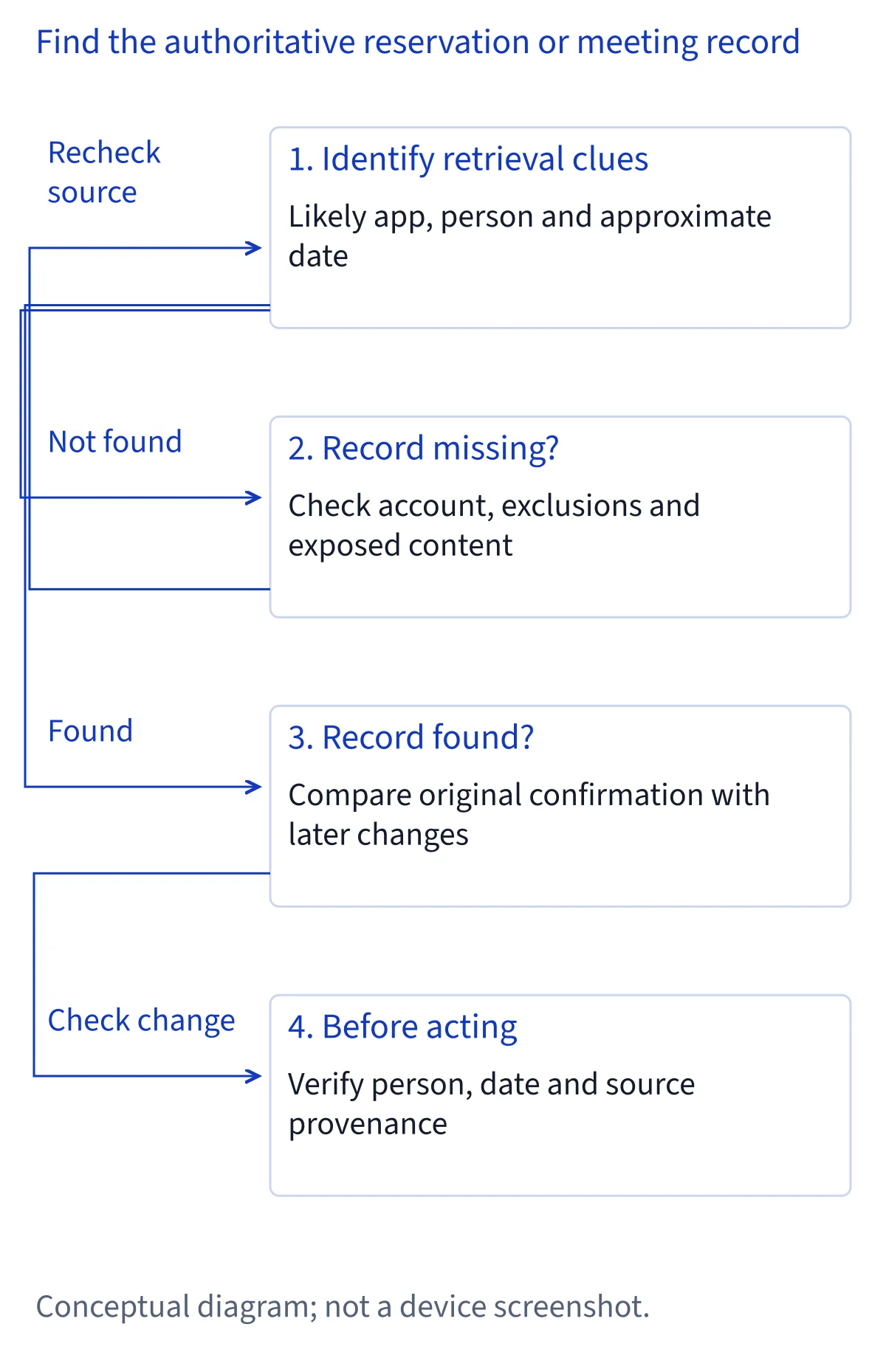
Before asking Siri to recover a detail, identify what you actually remember. A reservation might have arrived by email, a meeting change in a message, and a packing decision in a note. The likely app, approximate date and person involved provide a useful starting point. Distinguish the date something was discussed from the date it will happen; those clues can point to different records.
Apple describes personal-context understanding across Messages, Mail, Calendar, Notes, Reminders and more, while its introduction also mentions photos. This documentation-based review treats those descriptions as capabilities with boundaries, rather than proof that every item is accessible. Choose one concrete fact to locate first, such as the confirmed venue. A request combining every conversation, booking and travel preference makes it harder to determine which source supports each part of the answer.
Separate app information, Siri history and the screen
Personal information in an app, a previous conversation with Siri and content currently visible on your screen are different sources. Apple lists personal-context understanding, onscreen awareness and the dedicated Siri app separately. A detail mentioned during an earlier Siri conversation is not necessarily a detail retrieved again from its original email or calendar entry.
The Siri app can sync conversation history across devices through iCloud. That helps you resume a discussion, but an older answer may describe an earlier state of your plans. Likewise, opening a confirmation on the screen gives a specific item to discuss; it does not establish access to the rest of that app. When reviewing an answer, determine whether it reflects an original record, prior conversation or visible content. If the source is unclear, locate the underlying item manually before treating the answer as current.
Understand what an index can expose
Apple's developer announcement says Siri AI can surface any entity in the Spotlight semantic index, beyond entities fitting an existing schema. The important boundary is the indexed entity. This does not promise that every file, attachment, document block or account becomes searchable. An app's contribution can contain less information than the item you see when opening that app yourself.
Separate finding an item from answering a question about its contents. A title may help identify the right document without exposing the paragraph containing your booking reference. Similarly, the existence of an app action does not prove comprehensive content retrieval. For third-party software, examine the developer's documented content exposure and integration status. Apple's announcement describes a Developer Preview; it does not establish public availability for every participating app or every feature an app might eventually offer.
Recover a reservation without confusing proposals
Consider a restaurant reservation whose details you cannot remember. As an editorial organization example, start with the likely confirmation source, restaurant name, approximate booking date and person who arranged it. These are suggested retrieval clues, not official or tested voice commands. Keep the question focused on locating the confirmation before requesting a broader account of the evening.
Once you find a candidate record, inspect the original sender, reservation date, local time, party size and any later cancellation or change. A message discussing a preferred restaurant is weaker evidence than a confirmation, while an initial confirmation can be superseded by a later update. If Siri provides only a plausible summary without a traceable record, search Mail or Messages yourself. A successful information lookup also does not mean a reservation has been changed, canceled or communicated to anyone.
Resolve meeting changes and participant identity
A meeting can leave several overlapping records: an original invitation, a rescheduling email, a message about joining remotely and a note containing the agenda. In this proposed workflow, identify the organizer and approximate event date, then distinguish the scheduled event from informal discussion. Ask about one unresolved detail at a time rather than assuming all records agree.
Check participant identity carefully when names repeat or someone uses different personal and work addresses. A matching first name alone is not sufficient evidence that a message concerns the same meeting. Open the relevant calendar entry and compare it with the latest explicit update, including the time zone and meeting location. If the records conflict, preserve that conflict instead of accepting a blended answer. Consult the organizer through your usual process when the original material does not establish a clear current arrangement.
Build a trip record from separate facts
Travel information is often distributed across a confirmation email, a calendar entry, a shared note and a photograph of a sign or ticket. Apple describes photo context, but that description is not a guarantee that every image or its smallest printed detail can be retrieved. Treat each source as evidence for a particular fact rather than assuming a complete itinerary exists somewhere automatically.
As an editorial example, recover the accommodation confirmation first, then check arrival arrangements and separately verify transport details. Retain the source date alongside each fact. A hotel check-in date, flight departure date and message timestamp may differ, especially across time zones or overnight travel. If a result merges details from two trips, narrow the search by destination, traveler and year. For essential information that remains missing, open the provider's confirmation or your own records directly rather than reconstructing it from an uncertain summary.
Use Craft's limits as a concrete app example
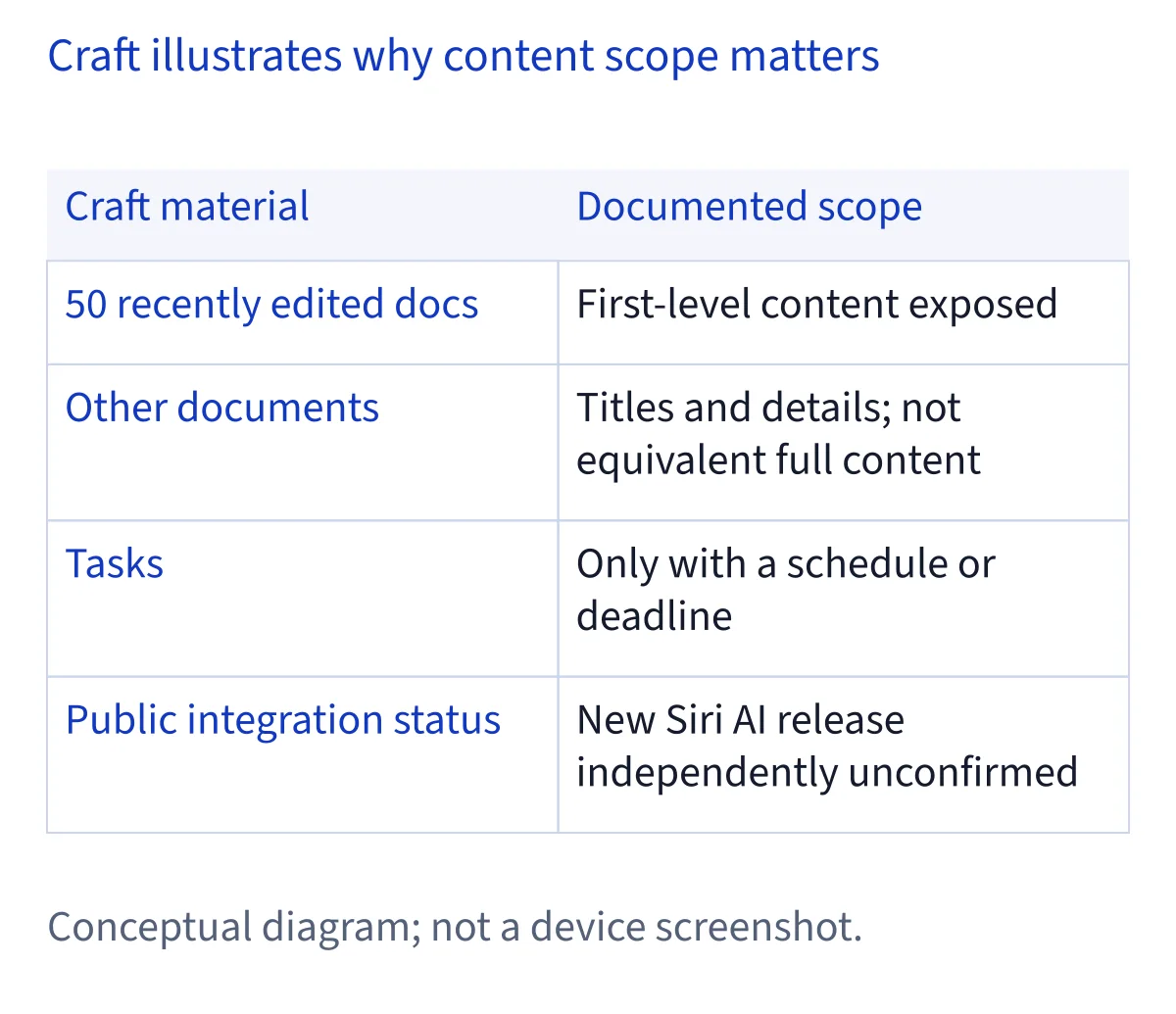
Craft documents updated Siri capabilities for querying document content, creating documents, appending text and managing tasks, with OS 27 requirements. Its documented sharing scope is specific: the 50 most recently edited documents expose first-level content, while other documents expose titles and details rather than equivalent full content. Only tasks with a schedule or deadline are included. These are Craft-specific boundaries, not universal Siri limits.
Craft also says rewriting, rearranging and deleting existing document content are unsupported, and describes Mac availability as an Apple beta. Its documentation and Apple's third-party Developer Preview timeline leave the new Siri AI public integration status independently unconfirmed. Do not resolve that uncertainty by declaring everything publicly available or by dismissing Craft as having only traditional Shortcuts. For a missing passage, consider whether its document or nesting falls outside Craft's stated scope, then open the document directly.
Control app scope separately from other privacy choices
Apple documents Settings > Siri > Excluded Apps as the control for stopping an app's contributed information from personalizing Siri, preventing actions in that app and preventing its data from informing suggestions across other apps. Adding an app therefore affects more than whether one search result appears. Review this setting when content is unexpectedly absent, and retain an exclusion when that boundary is intentional.
Do not treat this control as a substitute for every other privacy preference. Siri Suggestions, integration through Use with Siri for older apps, location access and improvement participation have separately documented controls. Excluding an app is also different from deleting Siri conversation history or deleting the original content inside the app. Decide which boundary you want to change before adjusting settings; restoring access merely to recover one item may be unnecessary when you can inspect that item manually.
Distinguish request processing from improvement participation
Apple's default Siri privacy notice says Siri AI requests may be processed on the device or sent to Private Cloud Compute. It says data processed in Private Cloud Compute is not stored there or made accessible to Apple. The same notice separately describes request-related data, Search handling and on-device interaction history. Those distinctions matter: one processing safeguard does not describe every record associated with using Siri.
Opting in to Improve Siri & Apple Intelligence changes the picture. Apple may store interactions, including audio, transcripts, responses and world-knowledge links, and a subset may receive human review under the stated rules. Apple describes steps to avoid collecting or retain less personal content, including information searched on your device. Review participation at Settings > Privacy & Security > Analytics & Improvements. This broader Siri privacy documentation should not be read as a promise that every app integration processes data identically.
Verify provenance, freshness and conflicting details
A useful answer should survive comparison with the source. Open any referenced original item when available; otherwise, locate it through the app's own search. Check who created or sent it, which account contains it, when it was written and whether a later record changes its meaning. A fluent response is not evidence that the latest source was retrieved.
Keep creation time, modification time and event time separate. A note edited yesterday may still describe last year's trip, and a recently forwarded email may contain an older confirmation. For time-sensitive arrangements, compare explicit dates and time zones rather than relying on relative words such as tomorrow. If two sources disagree, identify the conflicting fields and preserve both until you can resolve them. Before creating or changing an event from retrieved information, verify the intended record and the resulting action separately.
Choose a sensible fallback when information is missing
When Siri cannot find an item, first confirm that you can locate it in the expected app and account. Then review whether the app is excluded, whether its documented integration exposes that content and whether your clue identifies the correct person and date. An unsuccessful lookup alone cannot establish permanent non-support, deletion or loss of the underlying record.
Check general Siri AI eligibility only when the issue extends beyond a particular item. Its current six languages, matching device and Siri languages, account region and platform restrictions are separate from retrieval scope. If the source exists but remains unavailable through Siri, use manual app search. For repeated work, a documented Shortcuts workflow may provide a more explicit sequence of inputs and actions, although its permissions and content limits still apply. Finish with a verified fact or an acknowledged gap, rather than a guessed reconstruction.
Common questions
Can Siri AI search everything in all my apps?
Apple describes personal-context understanding across several apps, but does not guarantee universal access to every item. Retrieval depends on the content an app exposes, applicable controls and integration availability. Spotlight semantic index support concerns indexed entities. It does not establish that every file, attachment or nested document passage can be searched.
Is personal context the same as Siri conversation history?
No. Conversation history records previous interactions, while personal-context retrieval concerns information available from sources such as apps. Apple also describes onscreen awareness separately. A past Siri answer may no longer match an updated reservation or meeting. Check the original source when freshness matters, even if the conversation has synced across devices.
What does excluding an app from Siri change?
Apple says Excluded Apps stops an app's contributed information from personalizing Siri, actions within that app and use of its data for suggestions across other apps. This is separate from improvement participation, conversation-history deletion and deleting original app content. Review the intended boundary before changing an exclusion simply to recover one missing item.
Why might Siri find a Craft title but miss its contents?
Craft documents first-level content sharing for its 50 most recently edited documents; other documents expose titles and details. Tasks need a schedule or deadline. These vendor-specific limits can explain different retrieval depth. Craft documents updated Siri features, but public integration with the new Siri AI remains independently unconfirmed; open the document to verify missing content.