
What Siri AI processes and where
Siri AI can process requests on your device or through Private Cloud Compute, while Search, optional improvement sharing and external services follow different rules. Apple's legal notices distinguish these paths. This guide explains what each path handles, which choices affect it and why one privacy setting cannot govern every interaction.
Map the request before choosing a privacy setting
The useful starting point is a data path, rather than a blanket promise that Siri stays on your device. Apple's Siri, Dictation & Privacy notice distinguishes local processing, Private Cloud Compute, Search, contextual information, conversation history and interactions with external services. A request can involve more than one of these. Speaking a question, retrieving information from an app and searching for current information are therefore separate privacy decisions, even when they happen within one conversation.
Consent also has several layers. Enabling Siri AI allows its documented request processing; opting into improvement sharing adds collection and potential review for improvement purposes. Allowing app integration, enabling an extension and syncing through iCloud introduce other boundaries. For a practical decision, identify the content involved, the service receiving it and the purpose of any retention. The Apple legal notices supplied for this November 6, 2026 documentation snapshot are dated October 26, 2026. Their distinctions matter more than a general label such as private assistant.
Separate local processing from Private Cloud Compute
According to Apple's Siri, Dictation & Privacy notice, a spoken or typed Siri AI request may be processed on the device or sent to Private Cloud Compute. Apple describes the latter as a server-based intelligence system: it analyzes the request and determines how best to respond, including using local processing, current information from the web or information from apps. Cloud processing is therefore part of the documented design, even when the eventual response involves material on your device.
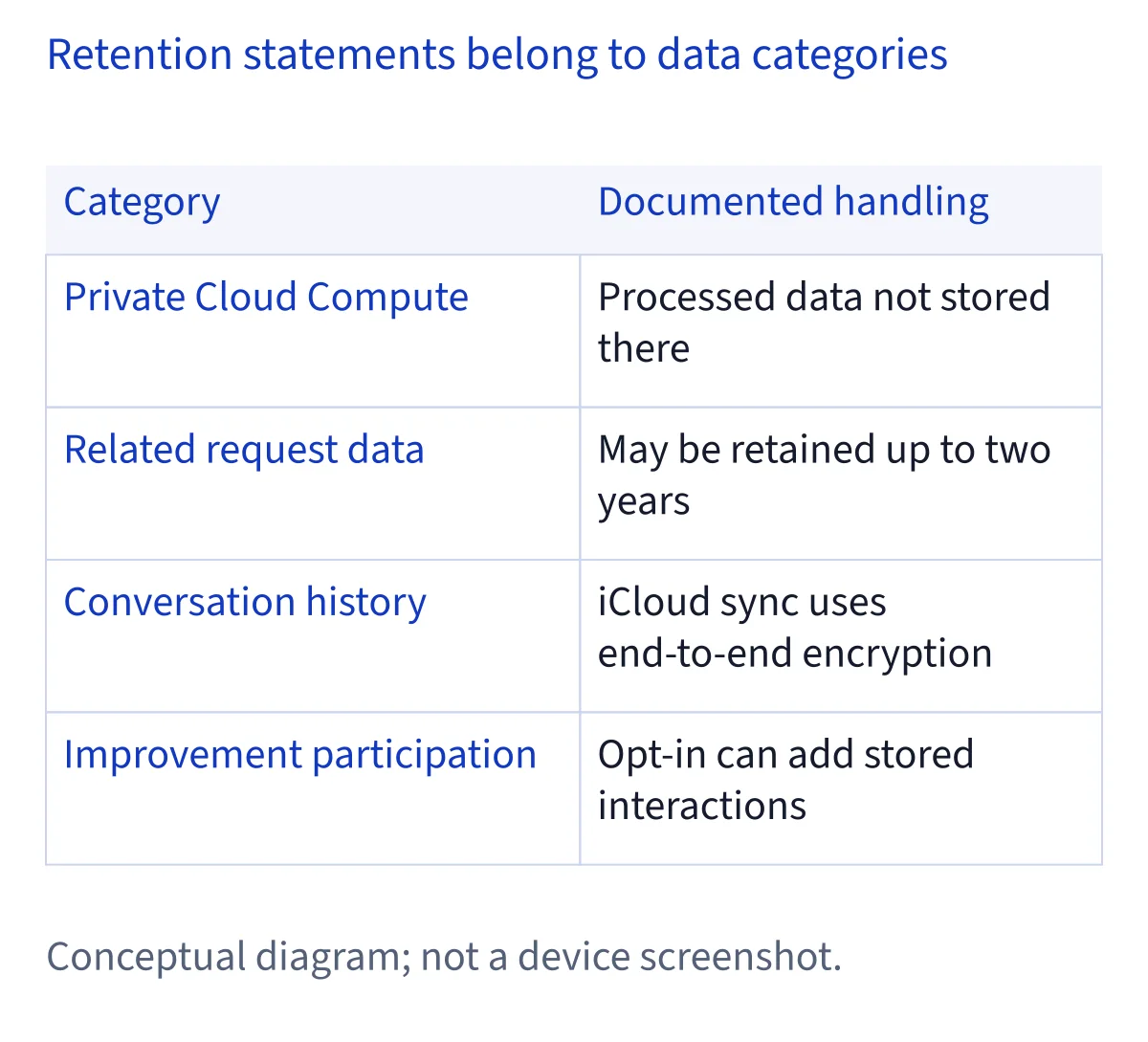
For data processed within Private Cloud Compute, Apple states that it is not stored or made accessible to Apple, and that the system does not retain it. That assurance belongs to this processing path. It does not establish that Search queries, improvement contributions, local conversation history or external services have identical retention rules. When assessing a sensitive task, ask which additional paths it requires. Do not treat a reference to Private Cloud Compute as a guarantee that every record associated with the interaction disappears.
Distinguish Siri Classic, Dictation and Search
For the older Siri experience, called Siri Classic here, Apple's legal notice says requests are not sent to Private Cloud Compute when Siri AI is unavailable or has not been enabled. They are processed on the device whenever possible and can use Search for relevant, current information. Dictation has its own processing indication in Keyboard settings; Siri settings likewise indicate whether speech is processed locally without being sent to Apple. Otherwise, Apple says speech is sent to it for processing. Under the default rules, Apple does not store the audio unless improvement sharing is enabled.
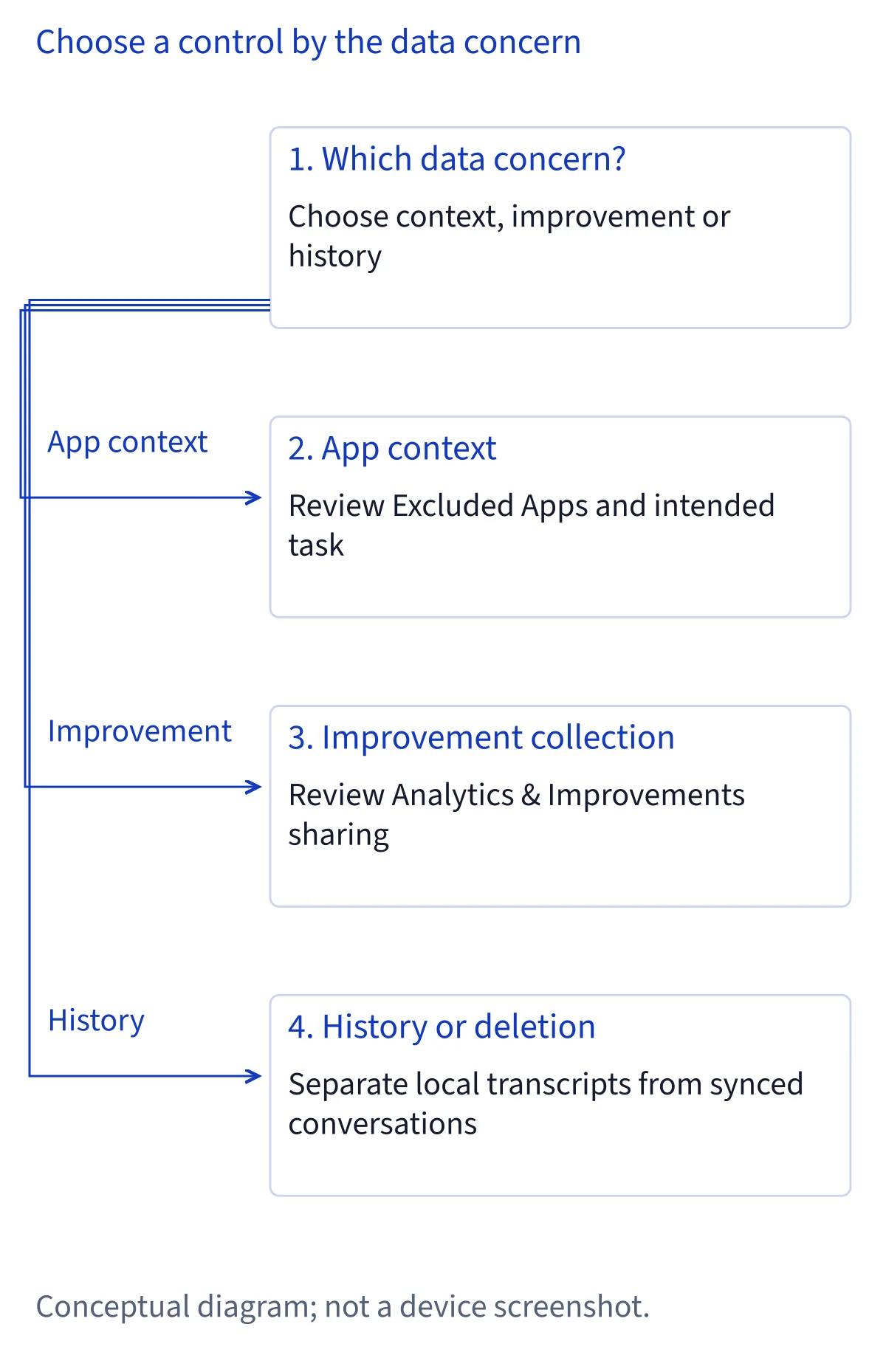
Search is a separate consideration. Apple says Search requests can be stored and used to improve Search, Siri and related features. Its notice identifies Settings > Search > Help Apple Improve Search as the relevant control. Turning this off does not cover Siri searches contributed through an enabled improvement program. Check that preference separately rather than assuming a single switch prevents every form of improvement collection.
Read retention periods by data category
Apple's default Siri and Dictation notice describes related request data such as request category, completion status, device specifications, configuration and performance statistics. Approximate location is included if Location Services for Siri is enabled. Apple says this data is associated with a random, device-generated identifier that rotates multiple times per hour and is not tied to an Apple Account or email address. It may retain and use this data for up to two years to develop and improve the specified services. This is not a statement that all Siri audio is retained for two years.
The separate Improve Siri & Apple Intelligence notice also specifies up to two years for data collected through that opt-in, but adds that a small subset of reviewed interactions may be kept beyond two years for ongoing improvement. Private Cloud Compute has the different, explicit nonretention statement described earlier. Do not extend either two-year window to every Search record or locally stored conversation: the supplied passages do not establish one universal expiration date.
Understand what improvement sharing adds
Apple's Improve Siri & Apple Intelligence notice says opting in while using Siri AI may allow Apple to store all Siri and Dictation interactions, including audio, typed and spoken transcripts, Siri responses and links opened from world knowledge searches. Apple describes safeguards: it does not collect photos or attachments supplied to Siri for this program, or notification content Siri reads, and takes steps to remove personal details and content drawn from messages, emails and local search results. These safeguards do not make the opt-in equivalent to default processing.
Contributed data may improve language features and train Apple's foundation models. A subset may be reviewed by graders; Apple specifies that audio review is performed only by Apple employees. Rotating identifiers are not tied to your account, but Apple may connect identifiers associated with a conversation when you return to it. Review the preference under Settings > Privacy & Security > Analytics & Improvements. Choosing to stop contributing is a prospective sharing decision, not proof that previously reviewed material has been erased.
Limit personal context before handling sensitive requests
Apple's Siri and Dictation notice lists contextual information that a device may send, including contact names and relationships, device and home names, labels in Photos or Reminders, installed app names and added shortcuts. It says this context helps understanding, is associated with a random identifier rather than an Apple Account, is not used to build a marketing profile and is never sold. Separately, Siri Suggestions uses local information to personalize suggestions. Do not combine these statements into a claim that every use of personal context stays local.
Apple documents Settings > Siri > Excluded Apps for preventing an app's information from contributing to personalization, actions or suggestions across apps. For a household, consider whether a request exposes another person's messages or information about a shared home. For work, consider employer rules and client confidentiality before asking. As practical advice, reduce a task to the information it needs and avoid unnecessary names or confidential passages. Excluding an app is not described as deleting that app's own records.
Treat iCloud sync and deletion as different questions
Apple's Siri and Dictation notice says Siri settings and Suggestions personalization sync through iCloud using end-to-end encryption. Voice enrollment audio also syncs with that protection. If Siri AI is enabled and iCloud is used, conversation history saved within the Siri app syncs across Apple devices using end-to-end encryption and cannot be read by Apple. This explains access across devices; it does not establish a separate backup, a recovery period or indefinite availability. Sync should not be treated as an archival plan.
The same notice documents an iCloud Siri switch under Settings > your name > iCloud > Saved to iCloud > See All for stopping personalization sync. It separately describes Turn Off Siri as deleting locally stored Siri and Dictation transcripts, and says disabling both Siri and Dictation deletes local transcripts used for personalization. Those statements concern local data. They do not promise deletion of every server record, previous improvement contribution or external service record. Establish which copy you want removed before choosing a control.
Recognize the boundary around external services
When Siri interacts with an external app or service, Apple's Siri and Dictation notice says that provider's terms and privacy policy apply. An action performed through Siri therefore needs the same attention to its destination as an action performed inside the app. Apple's notice also distinguishes Speech Recognition permission: allowing an app to transcribe speech can involve sending audio to Apple. Neither a documented shortcut nor an app integration establishes that the provider has Apple's Private Cloud Compute retention protections.
Apple's legal text describes separate image-sharing paths in Visual Intelligence. Tapping the Google search button sends an image to Google, while an enabled ChatGPT extension can receive images you choose to send. Apple says your IP address is obscured from these providers in that context. This is not a complete account of their retention practices. Apple also retains related ChatGPT extension request data under the rules in its notice, and improvement opt-in can add request and conversation collection. Assess both Apple's processing and the external destination before sharing.
Run a privacy audit with documented controls
Begin an audit by checking the Siri and Keyboard processing indications, then inspect improvement sharing and Help Apple Improve Search independently. Review Excluded Apps and, for apps built for older Siri versions, Use with Siri under Siri > Suggestions > the app name. Apple's notice documents these as different controls. Keep the English labels when matching this guide to an interface whose translated wording has not been established. Menu availability and wording should be checked on the device rather than assumed identical everywhere.
Next, review Siri location access, Speech Recognition permissions, iCloud Siri syncing and any enabled extensions. Apple documents turning Siri location access to Never under Privacy & Security > Location Services > Siri. Finally, consider connected devices: its notice says an improvement preference chosen during iPhone or iPad setup applies to newly configured connected devices with Siri, and can later be changed per device. Record which settings govern future sharing and which address local deletion. For confidential work or shared households, repeat this review when the people, apps or devices involved change.
Common questions
Does turning off improvement sharing stop Apple from processing Siri requests?
No. Apple's legal notices distinguish processing needed to answer a request from optional improvement collection. Siri AI can still use Private Cloud Compute, and Search has a separate improvement setting. Default related request data also has its own retention rules. Turning off improvement sharing does not establish that every request stays local or delete previously contributed information.
Does Apple keep every Siri interaction for exactly two years?
No. Apple specifies up to two years for certain related request data and for data collected through Improve Siri & Apple Intelligence. A small reviewed subset of opt-in interactions may be retained longer. Private Cloud Compute does not retain processed data under Apple's stated rules. These periods do not establish one expiration date for local history and every other data path.
Is end-to-end encrypted Siri history the same as a backup?
Apple describes this feature as syncing Siri app conversation history across devices through iCloud, with end-to-end encryption that prevents Apple from reading it. That statement does not promise an independent backup, a recovery window or permanent preservation. If retaining information matters, assess an appropriate storage method separately rather than relying on conversation sync as an archive.
What should I check before asking Siri about confidential work?
As practical advice, identify the information required, the apps involved and whether the request needs Search or an external service. Review employer rules, Excluded Apps, improvement sharing and relevant permissions. Apple's legal notices distinguish these paths and controls. Remove unnecessary confidential details, and do not assume that disabling one improvement setting authorizes sharing client or colleague information.