
iOS 27.3 Siri AI: What Apple Announced for 15 Apps
Apple announced a rollout of Siri AI actions across 15 apps alongside a developer preview in the 27.3 betas. The announcement names the apps but does not provide a tested command for each one. As of November 6, 2026, the preview gives developers a way to prepare third-party integrations; it is not their public launch.
What changed in the iOS 27.3 Siri AI announcement?
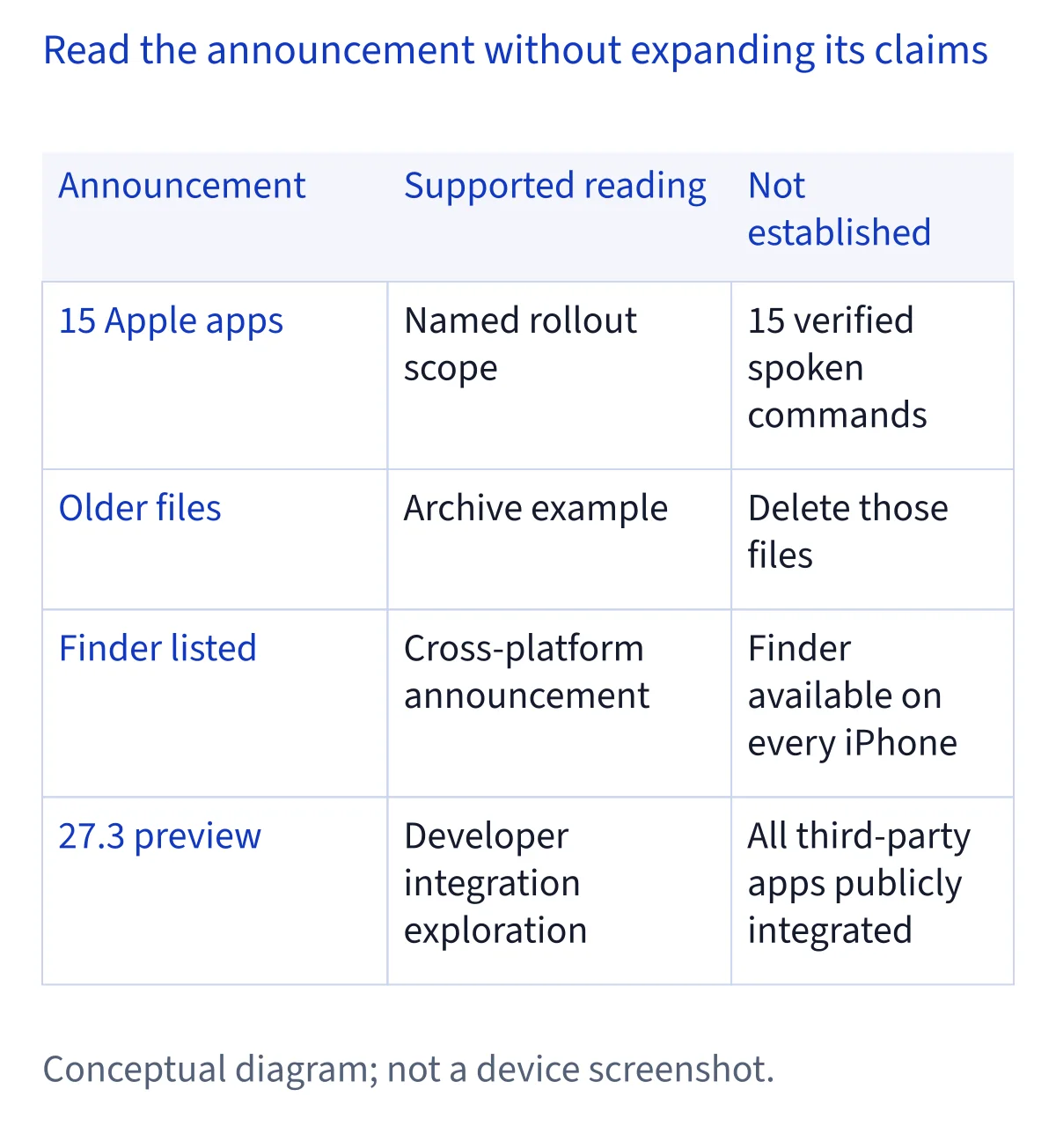
Apple's November 3 developer announcement names Calendar, Files, Finder, Journal, Mail, Maps, Messages, Music, Notes, Photos, Preview, Reminders, Safari, Shortcuts, and Weather in its Siri AI action rollout. That is a list of 15 Apple apps, not a list of 15 confirmed commands. Apple gives two examples of the kinds of requests it means: finding a café you visited last week and archiving files you have not opened for a year. Those examples help explain the direction of the update. They do not establish that every app supports every kind of request, or that a particular phrasing will work on your device today.
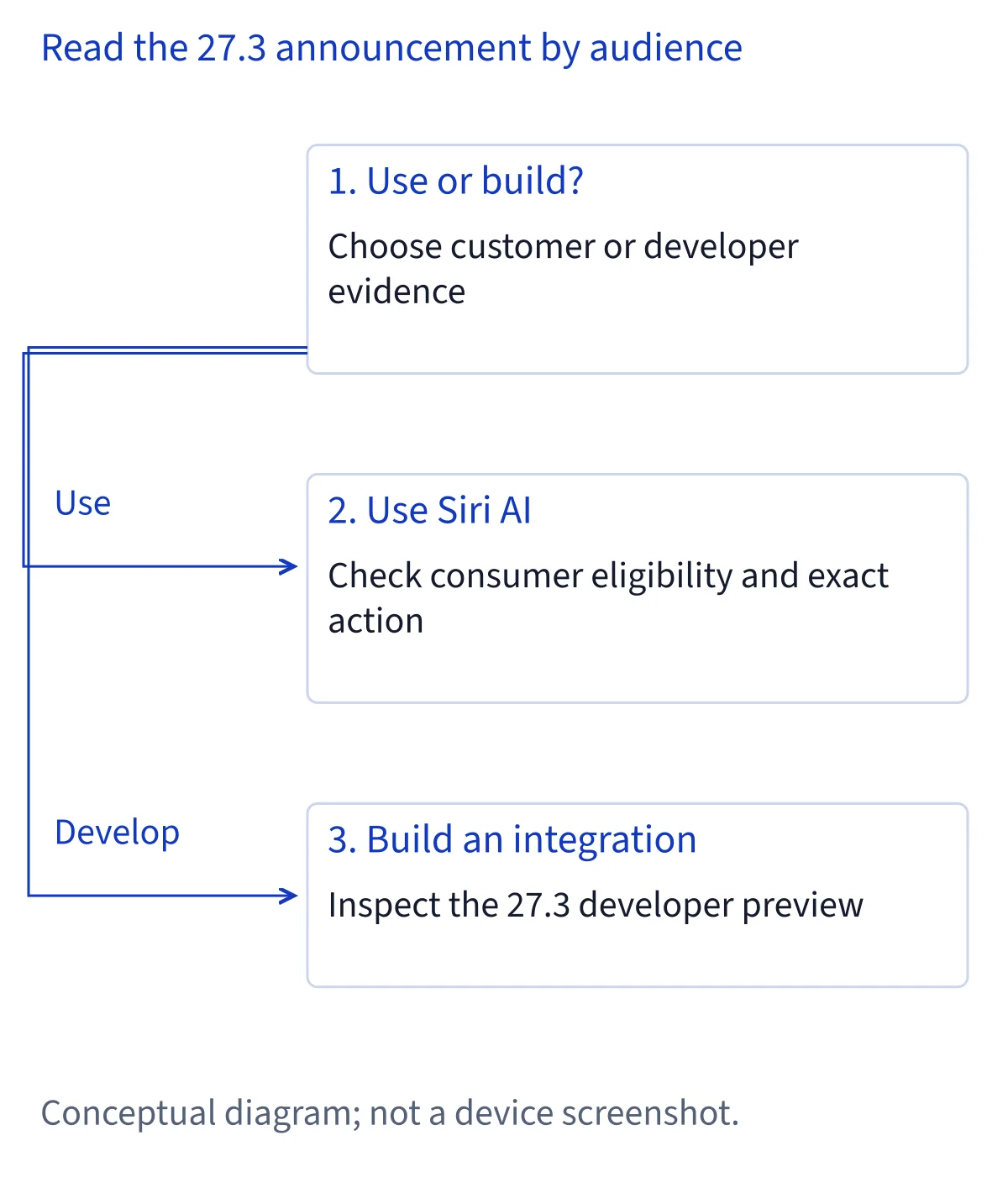
The announcement also opens a Siri AI Developer Preview in the iOS, iPadOS, macOS, and visionOS 27.3 betas. That preview concerns developers building integrations for their own apps. Apple's consumer support page separately describes Siri AI (Beta) and how eligible people can turn it on. Keeping these two tracks apart matters: access to Siri AI on a supported device does not by itself mean a third-party app has shipped a new integration. Likewise, inclusion in Apple's rollout announcement should not be read as a hands-on test of all 15 apps. The scope here is what Apple documented as of November 6, 2026.
Planning and files: Calendar, Files, Finder, Journal, Notes, Reminders
Calendar, Files, Finder, Journal, Notes, and Reminders form a useful planning-and-information group within Apple's announced list. These names describe where people keep appointments, documents, entries, notes, and tasks. The grouping is a way to read the announcement; it is not an Apple-published capability table. Apple has not supplied a separate, verified voice command for each of these six apps in the cited announcement. Avoid turning a broad rollout notice into promises about creating particular events, editing an entry, or changing a reminder. If you need one specific operation, its presence in this list alone is not enough to confirm it.
Apple's example about archiving files not opened for a year is especially easy to misread. Archive means archive in the example; it does not mean delete. The example illustrates how a request can combine a time condition with an action, but it is not a guarantee that every file can be handled that way or that the same wording applies across Files and Finder. Finder and Preview also appear in the cross-platform announcement. Their inclusion is no reason to claim that those apps, or their actions, are available on every iPhone. For a decision about your own setup, first identify your device and operating system, then distinguish an announced action from one you have actually seen work.
Communication: Mail and Messages
Mail and Messages are both on Apple's 15-app list. That makes communication a relevant part of the announced rollout, but the cited developer announcement does not provide a command-by-command inventory for either app. In particular, a list entry should not be turned into a claim that Siri AI can unsubscribe you from a mailing list, retract a sent message, or perform any other precise operation. Those may be questions worth checking when documentation or a public release supplies evidence; they are not verified examples for this article. The safe reading is narrower and more useful: Apple has named the apps, while the available actions and their behavior need their own evidence.
There is another distinction for people who already use Siri AI. Apple's consumer support material describes personal context as part of Siri AI, and it mentions information from apps including Mail and Messages. That description and the November action rollout are related, but they are not interchangeable. Understanding information relevant to a question is different from carrying out a change inside an app. If your goal is to act on a message or email, confirm the actual operation before relying on it, especially when the outcome would be difficult to undo. If your goal is to understand general setup or availability, use the consumer guidance rather than treating a developer announcement as a setup manual.
Finding information: Maps, Safari, and Weather
Maps, Safari, and Weather are the three information-finding apps in this editorial grouping of Apple's rollout list. Apple names each one, but naming an app does not specify which searches, changes, or follow-up actions it accepts. The café example in the announcement is about finding a place visited last week. It illustrates the kind of personal-context request Apple wants to support; the cited text does not establish a universal Maps command or identify a tested sequence of taps. Similarly, the presence of Safari and Weather does not verify a particular browser-management or city-management instruction. Treat a detailed command list from elsewhere as a separate claim that needs its own source.
This distinction matters when you are deciding whether the update solves a real problem for you. A broad statement such as “Safari is in the rollout” tells you where Apple is working. It does not tell you whether a specific action is ready on your device, whether it needs another condition, or whether it will behave the same way after the beta. For a practical check, define the outcome you need in ordinary language, look for documentation of that outcome, and verify the result before depending on it. That is advice for evaluating a changing beta, not an additional setup requirement from Apple.
Media and documents: Music, Photos, and Preview
Music, Photos, and Preview complete another part of Apple's announced app set. They cover different kinds of material, so it is tempting to infer playlists, photo edits, document changes, or other specific tasks from their names. The cited announcement does not provide a confirmed command for each of those possibilities. The reliable fact is that Apple included all three in the action rollout. To evaluate a particular task, you need evidence about that task, not just the app name. This is especially relevant for anything that would alter a collection or document: an announced integration is not a preview of every possible result.
Preview also highlights the platform boundary. Apple describes the developer preview across iOS, iPadOS, macOS, and visionOS, while its list of apps includes names associated with different device experiences. Reading that combined list as a promise that Preview is present and controllable on every iPhone would overstate it. If you read an example elsewhere, check which platform it describes before trying to apply it to your own screen. People interested in media should make the same distinction between an app being named and a specific action being available. This page records the announcement; it does not claim to have tested Music, Photos, or Preview on a device.
Shortcuts and the developer preview: two different meanings of actions
Shortcuts is also among the 15 apps in Apple's announced list. Its inclusion does not make every existing shortcut a verified new Siri AI integration. Apple describes a separate path for third-party developers: App Intents can expose an app's actions and content to the system. The developer announcement also describes skills that combine actions into a request and a Spotlight semantic index for app entities. These are descriptions of the integration tools and direction of the preview, not a public catalog of finished integrations. A developer can use the announcement to plan what to make available; a customer still needs evidence that a particular app has delivered and exposed a working feature.
An existing shortcut may already be useful to you, and the Shortcuts guide covers that route. But “works with Shortcuts,” “named in an Apple rollout,” and “verified to work with the new Siri AI integration” answer different questions. A third-party listing should not move to the last status simply because the app has documented shortcuts or because Apple opened a developer preview. If you are assessing an app, look for a specific publisher statement about the feature and its availability, then check what version and platform that statement concerns. That is a practical evidence check, not an Apple requirement for using Siri AI.
What can customers do now?
If you want to use Siri AI rather than build for it, start with Apple's consumer requirements. Its support page says to open Settings → Siri → Try Siri AI (Beta). If Siri is off, select Turn On Siri first; then follow the prompts to choose a voice, complete voice enrollment, and review privacy settings. Your device language and Siri language must match in a supported language, and your Apple Account region must qualify. Availability also depends on the listed device and operating system. These checks address access to Siri AI itself. They do not confirm that a newly announced action in one of the 15 apps is active for your account.
Apple says Siri AI downloads automatically after you opt in, although high demand can put you on a waitlist with variable waiting time. That conditional explanation is more useful than assuming that every person enters immediately or that everyone must wait. If the option is absent, check the relevant device, language, region, and system guidance before interpreting the absence as a failed 27.3 action. If you can turn Siri AI on but a particular app action does not behave as expected, keep those as separate questions. The announcement does not provide a device-by-device action checklist or an exact date when each announced action will reach everyone. Check documentation again when the release status changes.
What should developers prepare, and when can customers expect it?
For developers, the concrete news is access to a Siri AI Developer Preview through the 27.3 betas for iOS, iPadOS, macOS, and visionOS. Apple's announcement points to App Intents for supplying actions and content, skills for combining actions, and Spotlight's semantic index for entities. Those concepts help frame a design decision: identify the content people need to find and the actions they need to complete, then consult Apple's developer documentation for implementation details. The announcement alone does not establish that an app's integration is finished, approved for public distribution, or available on every platform. It also does not name a watchOS 27.3 developer preview in this list of preview platforms.
Apple describes customer availability in the coming months and App Store submissions in spring, without giving a fixed launch date in the announcement. Neither phrase supplies a guaranteed day for your app or device. If you depend on a particular integration, look for the publisher’s release notes naming the supported version, platform and action before changing your workflow. Developers can prepare and evaluate their integrations against the documented preview; customers can continue using the consumer setup guidance while checking whether the specific app feature they need has actually shipped. Recheck those two sources separately as releases arrive.
Common questions
Are all 15 Siri AI app actions available on my iPhone?
Apple named 15 apps in an announced action rollout, but its announcement is not a list of actions verified on every iPhone. Finder and Preview also appear in a cross-platform context. Check your device and Siri AI eligibility separately, then look for documentation of the particular action you want. This page does not claim to have tested the rollout on a device.
Does iOS 27.3 make third-party Siri AI integrations public?
The November 3 announcement opens a developer preview through the 27.3 betas for iOS, iPadOS, macOS, and visionOS. A preview for building and evaluating integrations does not establish that any particular third-party app has released one to customers. Apple described customer availability in the coming months and App Store submissions in spring, without stating an exact public release date.
Did Apple say Siri AI can delete files left unopened for a year?
No. Apple's documented example is to archive files that have not been opened for a year. Archiving and deleting are different outcomes, so substituting one word for the other changes the claim. The example explains the sort of request Apple envisions; it is not a guarantee about every file, app, device, or wording you might try.
How do I turn on Siri AI while the 27.3 preview is underway?
For eligible consumers, Apple documents Settings → Siri → Try Siri AI (Beta). If Siri is off, turn it on first and follow the prompts. Your device and Siri languages must match in a supported language, and device and Apple Account region requirements also apply. This setup concerns Siri AI itself; it does not grant public access to a third-party developer preview.