
Apple Intelligence China: Buying and Everyday Use Guide
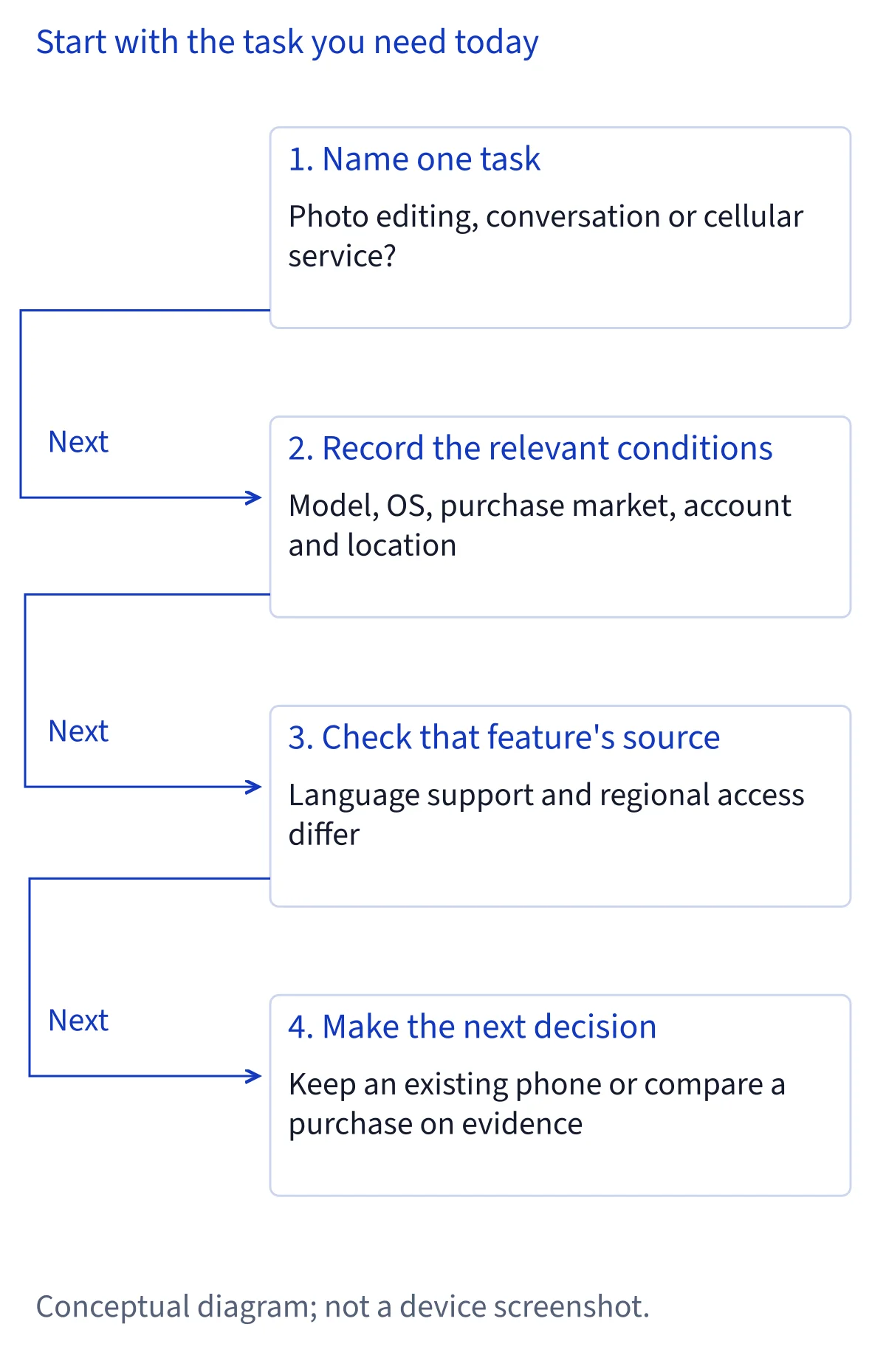
For Apple Intelligence in mainland China, start with the task you need and the phone you actually have. Purchase market, account region, location and language can affect the answer. This guide helps you assess photo editing, Siri AI and domestic eSIM separately before keeping, replacing or buying an iPhone.
1. Choose the task you need your phone to complete
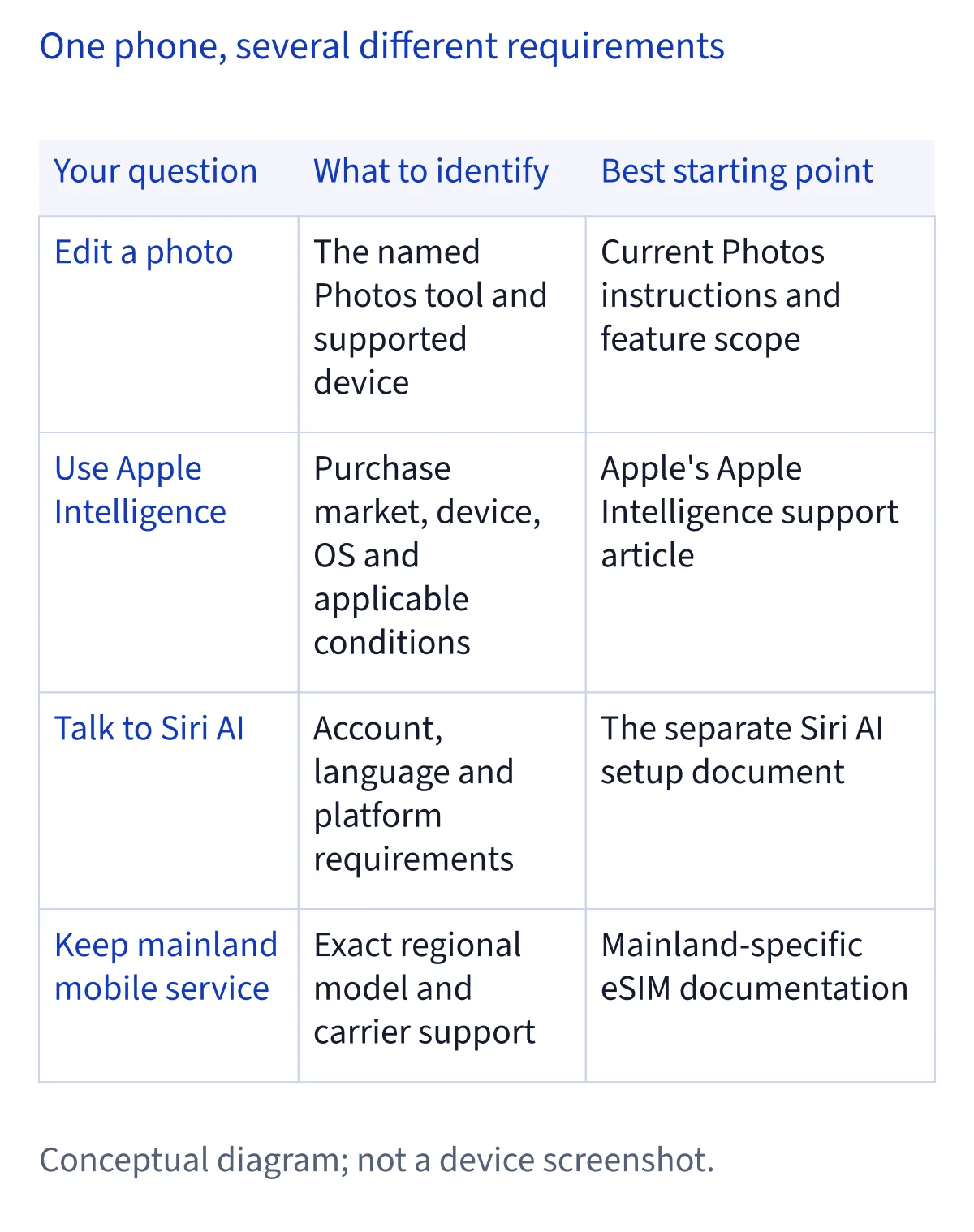
Write down one result you need: removing a distraction from a photo, improving a draft, or asking Siri AI to help with information and app actions. These are different capabilities. A general promise of full AI does not tell you which one is supported on your device, or whether a request actually finishes. For photo removal, assess the edited image; for an assistant, assess the specific conversation or action you need.
Wanting those tasks alongside a reliable domestic phone number is a reasonable reading of the social post that prompted this guide. It is our editorial interpretation, not a survey of buyers. Start your own decision with three priorities: the essential AI task, the mobile service you must retain, and the disruption you can accept. This makes it easier to decide whether your existing phone meets your needs or whether a purchase would solve a documented limitation.
2. Record five eligibility facts, then check language
Before comparing offers or diagnosing a missing feature, record your exact device model, installed OS version, original purchase market, Apple Account country or region, and current physical location. Keep purchase market separate from where you bought a used phone: a local resale does not tell you where the device was originally sold. If that information is unclear, ask the seller for documentation rather than relying on a region label in an advertisement.
Then record the device and Siri languages. Hardware support, software support and service availability are separate checks; passing one does not establish the others. Use the requirements for your chosen feature to evaluate this information together. Our compatibility checker is a starting point for official eligibility, not a test of a modified phone. Keep this small record when asking Apple, a seller or a carrier for help, so the answer addresses your configuration rather than a different model or market.
3. Apply Apple's China rules to the feature you want
Apple's Apple Intelligence support page says its features do not currently work on supported devices purchased in China mainland. For supported devices purchased outside China mainland, it states another restriction when both your physical location and your Apple Account country or region are in China mainland. Preserve that combined condition when assessing an imported phone. Simply having an account registered elsewhere is not proof that every other requirement is satisfied.
Siri AI has a separate setup page with its own mainland-China account restriction. That page currently lists English, French, Japanese, Korean, Portuguese and Spanish, with matching device and Siri languages required. Broader Apple Intelligence language support, including Chinese, does not mean every feature works in every mainland configuration. Likewise, photo-editing availability cannot establish Siri AI access. Check the document for your task and platform. These are the published conditions reviewed on November 9, 2026, not a promised date for a mainland launch.
4. Decide domestic eSIM support independently
A working AI feature does not establish that a domestic mobile plan can be activated. Apple's mainland eSIM page identifies eligible models, including iPhone Air A3518 and iPhone Duo A3721, alongside iPhone 18 Pro, 18 Pro Max and 17e. For supported iPhones purchased in China mainland, it specifies up to two eSIMs can be activated and stored. The general eSIM page's eight-or-more storage wording does not replace this specific rule.
Check the exact model and your carrier's process before choosing an eSIM-dependent phone. Apple's mainland guidance requires carrier-store activation with identity verification. Treat stored profiles, plan activation and simultaneous service as separate questions when discussing your needs with the carrier. A changed device region label does not prove extra capacity or successful provisioning. For a main phone, first establish that the domestic number and services you need have documented support; evaluate AI availability on its own evidence afterward.
5. If you already own the phone, choose the smallest change
Use your eligibility record to distinguish a documented regional restriction from a missing setting or an incomplete setup. If the official conditions support your configuration, follow the setup guidance for that feature and investigate the specific symptom. If the conditions exclude it, repeated setup attempts do not provide a basis for planning on official access. You can keep the phone for the work it already handles while choosing another supported way to complete the remaining task.
For example, decide whether photo cleanup inside Photos is essential or whether a separate editing workflow would meet your needs. That is a personal workflow choice, not a claim that another app has equivalent features or privacy terms. Include migration time, existing data and mobile service in the cost of replacement. Keeping a satisfactory device can be a reasonable decision when the missing feature is occasional; replacing it needs a documented benefit for your actual configuration.
6. Before buying, verify the complete everyday combination
For a new purchase, compare the exact device and original sales market against both your essential AI task and your domestic carrier needs. Ask for the model number and purchase-market documentation before paying. An imported phone is not automatically eligible for every Apple service or every mainland mobile plan. Avoid treating an overseas model name as a complete answer to questions about your account, location, languages or carrier activation.
Make the purchase decision using capabilities supported today. If a seller demonstrates something, ask which task completed, on which configuration, and whether the demonstration matches the device being sold. Read the applicable return and service terms rather than assuming a demonstration guarantees continued access. Do not pay a premium solely for a prediction about future China availability or an unexplained full-AI label. If no documented combination satisfies both priorities, decide which requirement can wait before committing to a replacement that may leave the same task unresolved.
7. Plan travel without sacrificing your domestic number
If you travel, make a separate mobile-service plan before changing profiles. Apple's mainland eSIM guidance describes conditions for installing overseas travel plans, including being outside China mainland for the relevant process. It also says that reactivating a deleted domestic eSIM requires visiting the carrier's store. Do not delete your everyday line to imitate a screenshot or to test a capacity claim. Confirm the supported travel arrangement with your carrier while your existing service is still intact.
Travel also affects the location information used in an AI availability check, but crossing a border is not evidence that every initial activation requirement has disappeared. Apple's wording about continued use after enabling a feature should not be read as a universal promise about first-time setup abroad. Keep mobile service and AI as separate travel questions. Note the model, destination, intended plan and feature you need, then check each applicable document rather than assuming one successful connection proves the whole phone configuration.
8. Evaluate an unlock claim before relying on it
The supplied social image contains an outer post and a quoted post by the same author. That is not two independent trials. The claim of full functionality does not document every AI feature, and the quoted suggestion about more eSIM capacity is explicitly uncertain. The posts' absolute dates are unknown. Visible likes and views cannot tell you search demand or how many buyers reproduced the result.
GestaltX describes changes to local capability flags, with results dependent on the model, OS and Apple services. A local change does not itself establish server access, carrier approval or persistent behavior after updates. Its backup and restoration descriptions are developer claims, not our recovery tests. For your decision, distinguish official eligibility, a developer's description and a person's reported result. Seek evidence of your particular task and configuration before relying on it for a purchase or main phone. Our separate project guide covers those claims without turning them into an official entitlement.
Common questions
Does Chinese language support mean Apple Intelligence works in mainland China?
No. Language support and regional eligibility are different requirements. Apple distinguishes mainland-purchased devices from devices purchased elsewhere, and Siri AI has its own account-region and language rules. Check your model, OS, purchase market, account region and location against the documentation for the exact feature, rather than treating Chinese support as universal mainland availability.
Will an imported iPhone guarantee Siri AI and a domestic eSIM?
No guarantee follows from the import label. You must assess the exact model and purchase market, Apple's feature-specific conditions, and your carrier's activation support separately. A seller's demonstration should match the configuration you will use. Do not assume a different account region alone resolves every AI requirement or establishes mainland eSIM eligibility.
Can I store more eSIMs by changing the phone's regional label?
The reviewed evidence does not establish that. Apple's mainland-specific guidance says supported iPhones purchased there can activate and store up to two eSIMs. Generic storage descriptions do not override that rule. The supplied post speculates about extra capacity without demonstrating it. Keep your active domestic plan intact while checking model and carrier requirements.
Should I replace my mainland iPhone just to get AI features?
First identify the essential task and check whether a replacement has documented support in your intended configuration. Include domestic connectivity, migration effort and purchase terms in the decision. Keeping your current phone and using another supported workflow may suit an occasional task. A vague full-AI claim or an unannounced mainland launch date is not a reliable purchasing basis.