
Siri AI in the EU: Which Devices Can Use It?
Siri AI (Beta) is unavailable on iOS 27, iPadOS 27 and watchOS 27 in the EU. An eligible Mac running macOS 27 Golden Gate or Apple Vision Pro running visionOS 27 can use it with an EU Apple Account when the device and Siri use the same supported language. Spanish support does not change the iPhone restriction.
What is the EU rule for each platform?
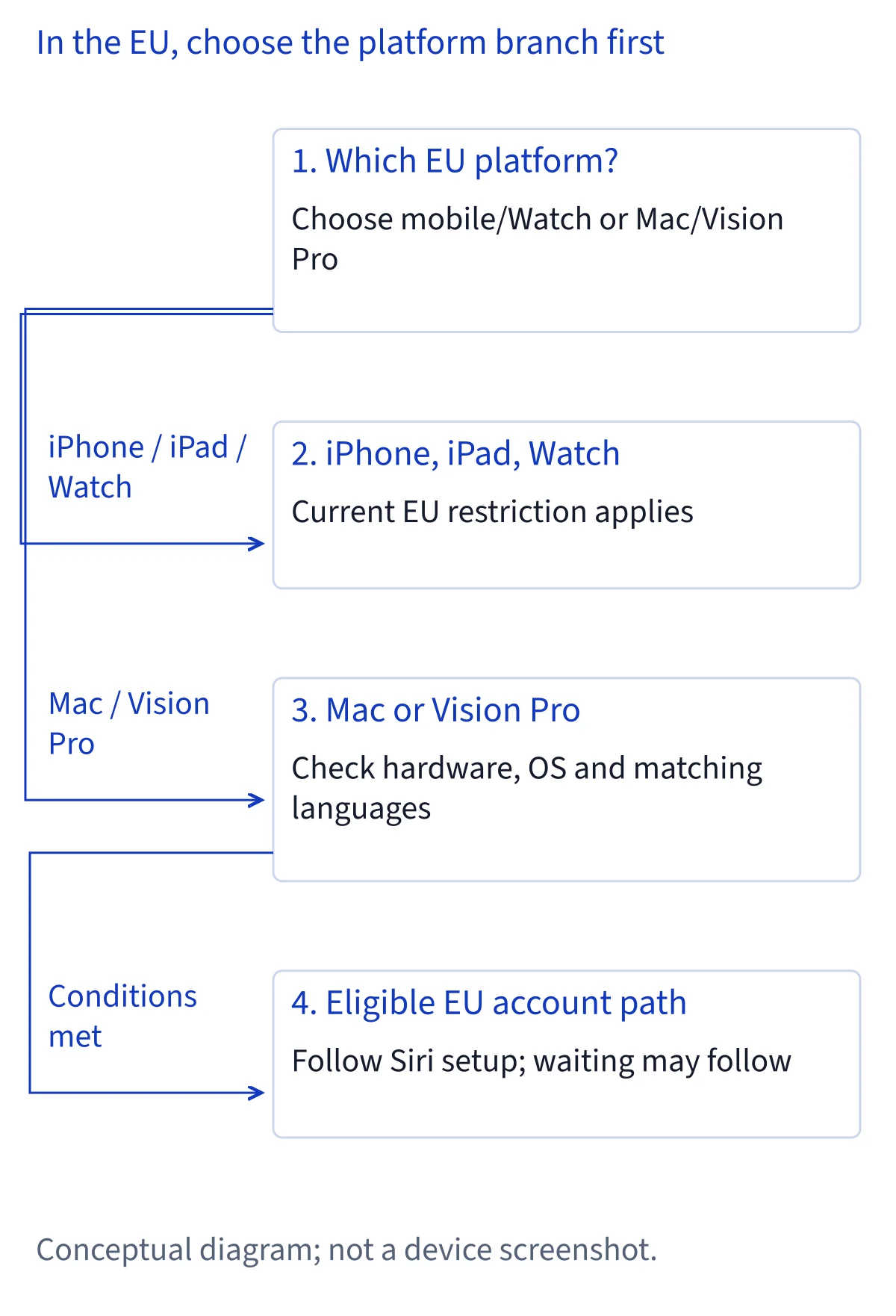
Apple’s current support page draws a platform distinction. Siri AI is unavailable on iOS, iPadOS and watchOS in the EU. That covers the iPhone, iPad and Apple Watch paths, even when a particular model appears on Apple’s general supported-device list. A supported model and the required operating system are necessary checks, but they do not override the EU restriction on those platforms. If the Siri AI option is missing on one of them, first consider the platform rule before assuming that a setting is broken.
The Mac and Apple Vision Pro paths differ. Apple says an EU Apple Account can use Siri AI on macOS 27 Golden Gate or visionOS 27 when the device and Siri languages match and are supported. Hardware still matters: Apple lists M1 or later Macs and MacBook Neo with A18 Pro, as well as Apple Vision Pro. An Intel Mac is outside the listed Mac hardware. Treat each device separately; having one eligible computer does not make an iPhone, iPad or Watch eligible.
Why do hardware, software and account checks all matter?
Start with the exact device and operating system rather than the name of a product family. Apple lists iPhone 15 Pro models, iPhone 16 models or later, iPhone Duo and iPhone Air for Siri AI on iOS 27. Its iPad list includes iPad mini with A17 Pro or A20 Pro and iPads with M1 or later. Those lists describe hardware eligibility; they do not promise availability on iOS or iPadOS in the EU. An iPhone can meet the model and software requirements yet still fall under the EU platform restriction.
Next check the Apple Account region and language conditions for the platform you intend to use. Apple expressly permits an EU Apple Account on the eligible macOS and visionOS paths, provided the language requirements are met. Do not infer from that statement that every Apple operating system shares the same regional treatment. For a Mac, check its chip and macOS version; for Vision Pro, check visionOS and the language settings. If you are comparing several devices, record the result for each one instead of carrying a Mac result over to your phone.
Which languages work with an EU Mac or Vision Pro?
Apple currently lists six supported Siri AI languages: English, French, Japanese, Korean, Portuguese and Spanish. On an eligible EU Mac or Vision Pro, the device language and Siri language must be set to the same supported language. The requirement is about the pair of settings, not simply whether you can speak one of those languages. If your device uses Spanish while Siri is set to English, the two settings do not match. Check both before looking for the beta option or diagnosing a missing entry.
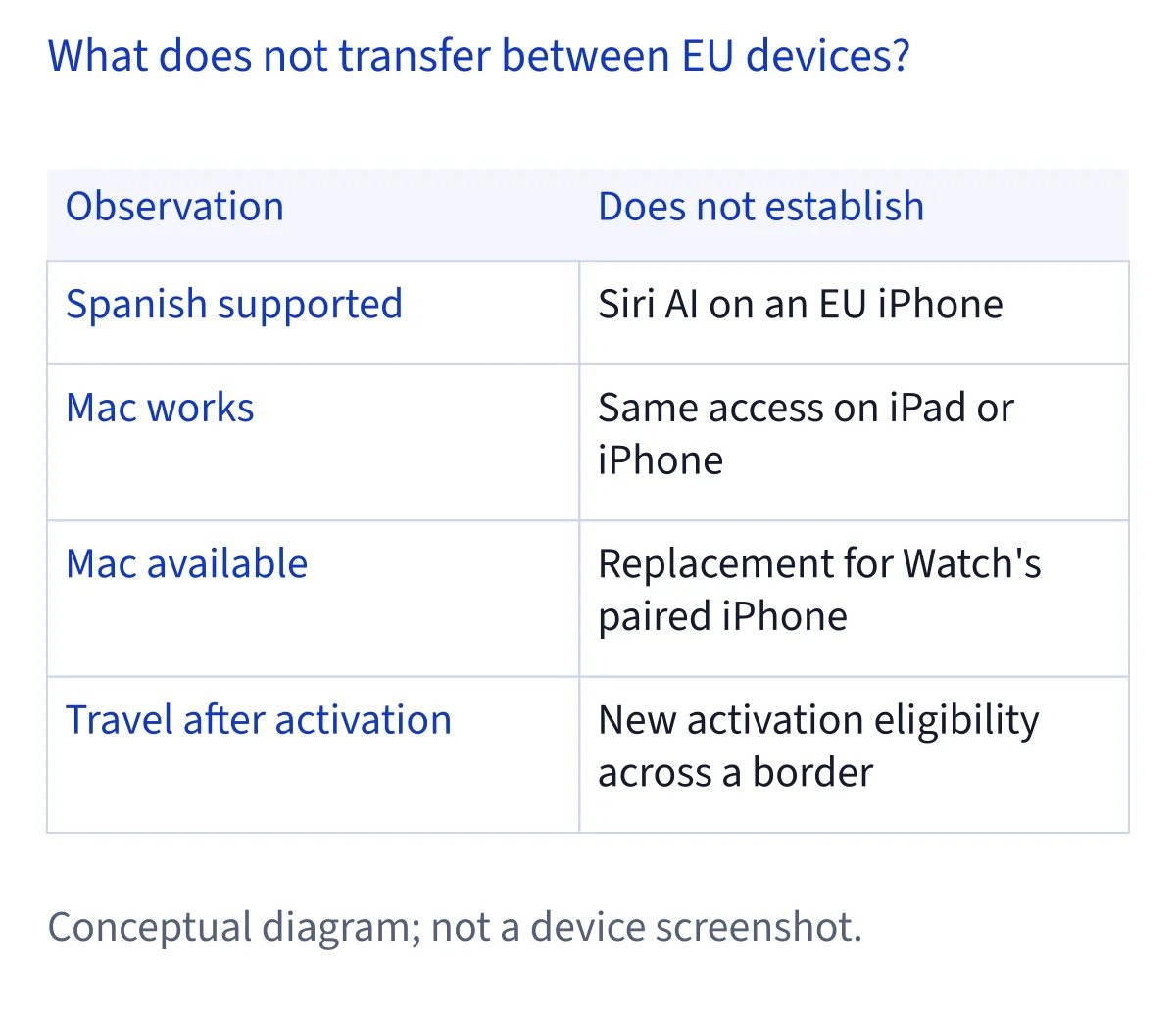
Spanish being on the language list is useful for an eligible Mac or Vision Pro configured in Spanish. It does not mean Siri AI is available on an iPhone in Spain or elsewhere in the EU. Language availability and platform availability are separate conditions. Likewise, selecting English does not remove the EU restriction on iOS, iPadOS or watchOS. If you read older advice that mentions only English for EU Macs, use Apple’s current six-language list and its matching-language requirement when checking your setup.
How do you check an eligible Mac or Vision Pro?
First confirm the hardware, operating system, Apple Account region and two language settings. For a Mac, compare its chip with Apple’s M1-or-later and MacBook Neo A18 Pro list, then confirm macOS 27 Golden Gate. For Apple Vision Pro, confirm visionOS 27. With an EU Apple Account, set the device and Siri to the same language from Apple’s supported list. This order helps you identify which requirement needs attention without treating the presence or absence of one menu item as a complete compatibility test.
Apple describes the setup path as Settings → Siri → Try Siri AI (Beta). If Siri is off, its instructions say to choose Turn On Siri first. The setup then prompts you to choose a voice, complete voice registration and review privacy settings. These are Apple’s English menu labels; the wording displayed on your device may differ by interface language. Apple also says Siri AI downloads automatically, although high demand can put a request on a waitlist for a variable time. A delay after starting setup therefore needs a different explanation from a platform restriction.
Can an Apple Watch use an eligible Mac instead of an iPhone?
No. Apple’s Watch requirement is specific: a supported Apple Watch must be paired with an Apple Intelligence-capable iPhone that has Siri AI turned on. Apple lists Series 9 or later, Ultra 2 or later and SE 3 with watchOS 27, but the Watch model and software are only part of the requirement. A Mac running Siri AI does not serve as the paired iPhone. Apple Vision Pro does not replace that iPhone either. The EU unavailability of Siri AI on watchOS must also be considered independently.
This distinction matters if your household has a compatible Mac but uses an Apple Watch for daily requests. Success on the Mac confirms something about that Mac’s own setup; it says nothing about the Watch pairing requirement. Likewise, ownership of a listed Watch model does not establish that its paired iPhone can have Siri AI enabled in the EU. When checking a Watch, examine its watchOS version, its exact model, the paired iPhone and the platform’s regional availability together. Do not rely on a result from another device.
Does travel change EU eligibility?
Apple says you can continue using Siri AI while traveling abroad after you have turned it on. That is a statement about continued use of an already enabled service. It is not a promise that a device on which Siri AI was unavailable in the EU will gain a new activation path as soon as you cross a border. It also does not remove the stated requirements for hardware, software, Apple Account region and matching languages. Keep those questions separate when planning to use a device on a trip.
For an eligible Mac or Vision Pro, check and complete the documented setup under the applicable conditions before treating travel as a factor. If an iPhone, iPad or Apple Watch is your only device, the current EU platform rule remains the relevant starting point. Apple’s cited support page gives no future date for lifting that restriction, so there is no reliable date to plan around. Revisit the current support information when Apple changes it; a forecast or a different device’s eligibility cannot stand in for a published platform update.
What should you do when the option is absent?
Identify the platform first. On an iPhone, iPad or Apple Watch in the EU, Apple’s regional rule explains why meeting a model requirement alone is insufficient. On an eligible Mac or Vision Pro, work through the checks in order: exact model, required OS, EU Apple Account, and matching supported device and Siri languages. Then consult Apple’s Settings → Siri setup path. If Siri is off, Apple says to turn it on before looking for Try Siri AI (Beta). Each check answers a different question, so keep track of which one fails.
If you can start the beta setup but the download is pending, Apple says high demand may cause a waitlist; that is a different situation from a missing option or an ineligible platform. If setup completes but a request fails afterward, investigate the behavior as a separate troubleshooting issue. The published sources do not give a date when Siri AI will become available on EU iOS, iPadOS or watchOS. The useful next step is to verify your actual device against current Apple information, then use the guidance for the specific stage where you are stuck.
Common questions
Is Siri AI available on iPhone in the EU if I use Spanish?
No. Spanish is one of Apple’s supported Siri AI languages, but Apple says Siri AI is unavailable on iOS in the EU. A supported language does not cancel a platform restriction. The Spanish setting can matter for an eligible Mac or Vision Pro with an EU Apple Account when its device language and Siri language match.
Can I use Siri AI on a Mac with an EU Apple Account?
Yes, if the Mac meets Apple’s hardware requirements, runs macOS 27 Golden Gate, and its device and Siri languages are the same supported language. Apple lists Macs with M1 or later and MacBook Neo with A18 Pro. Check the exact machine and settings; the EU account allowance for Mac does not extend to an iPhone.
Can my Apple Watch use Siri AI through my eligible Mac?
No. Apple requires a supported Watch to be paired with an Apple Intelligence-capable iPhone that has Siri AI enabled. A Mac does not replace that paired iPhone, even if Siri AI works on the Mac. Apple also states that Siri AI is unavailable on watchOS in the EU, so the Watch must be assessed under its own platform rule.
Will traveling outside the EU let me activate Siri AI on my iPhone?
Apple says Siri AI can continue working during travel abroad after it has been turned on. Its statement does not guarantee a fresh activation on an iPhone where the option was unavailable in the EU. Check the current eligibility rules for your particular device and account. Apple gives no date in the cited support page for changing the EU iOS restriction.